The Normal Distribution, Interactively
Statistics
Distributions
Move the sliders, hover the charts and rotate the surface to build real intuition for the most important distribution in statistics.
The normal distribution appears everywhere: measurement error, heights, test scores and the sampling distribution of almost any average. Instead of memorising its formula, let us play with it.
TipWhat you will learn
- How \mu and \sigma shape the bell curve
- Where the 68–95–99.7 rule comes from
- How two correlated normals form a 3D surface
The formula
A random variable X \sim \mathcal{N}(\mu, \sigma^2) has density
f(x) = \frac{1}{\sigma\sqrt{2\pi}} \exp\!\left(-\frac{(x-\mu)^2}{2\sigma^2}\right) \tag{1}
Explore the parameters
Drag the sliders. The shaded band is \mu \pm k\sigma, and the readout shows the probability it contains.
NoteThe 68–95–99.7 rule
Set the band to 1\sigma, 2\sigma and 3\sigma. The readout gives about 68.3%, 95.4% and 99.7%, no matter what \mu and \sigma are.
Samples versus theory
Hover over the bars to read exact values. Drag to zoom and double-click to reset.
Show the code
import numpy as np
import plotly.graph_objects as go
from scipy import stats
from ms_charts import COLORS, PLOTLY_CONFIG   # also registers the "mlstation" Plotly theme

rng = np.random.default_rng(0)
samples = rng.normal(0, 1, 10_000)
x = np.linspace(-4, 4, 400)

fig = go.Figure()
fig.add_histogram(x=samples, histnorm="probability density", nbinsx=70, name="Samples",
                  marker=dict(color=COLORS["indigo"], opacity=0.35, line=dict(width=0)))
fig.add_scatter(x=x, y=stats.norm.pdf(x), mode="lines", name="Theory",
                line=dict(color=COLORS["indigo"], width=3))
fig.update_layout(height=360, xaxis_title="x", yaxis_title="Density", bargap=0.02,
                  hovermode="x unified")
fig.show(config=PLOTLY_CONFIG)Two variables at once
With correlation \rho, two normals form a bivariate surface. Rotate it by dragging.
f(x, y) = \frac{1}{2\pi\sqrt{1-\rho^2}} \exp\!\left(-\frac{x^2 - 2\rho xy + y^2}{2(1-\rho^2)}\right)
Show the code
import numpy as np
import plotly.graph_objects as go
from ms_charts import SURFACE_SCALE, PLOTLY_CONFIG

rho = 0.6
g = np.linspace(-3, 3, 80)
X, Y = np.meshgrid(g, g)
Z = np.exp(-(X**2 - 2*rho*X*Y + Y**2) / (2*(1 - rho**2))) / (2*np.pi*np.sqrt(1 - rho**2))

fig = go.Figure(go.Surface(x=X, y=Y, z=Z, colorscale=SURFACE_SCALE, showscale=False,
                           contours=dict(z=dict(show=True, usecolormap=True, project_z=True))))
fig.update_layout(height=420, margin=dict(l=0, r=0, t=0, b=0),
                  scene=dict(xaxis_title="x", yaxis_title="y", zaxis_title="density",
                             camera=dict(eye=dict(x=1.5, y=1.3, z=0.75)), aspectratio=dict(x=1, y=1, z=0.6),
                             xaxis=dict(backgroundcolor="rgba(0,0,0,0)"),
                             yaxis=dict(backgroundcolor="rgba(0,0,0,0)"),
                             zaxis=dict(backgroundcolor="rgba(0,0,0,0)")))
fig.show(config=PLOTLY_CONFIG)Checking normality
A Q–Q plot compares sample quantiles with theoretical ones. Points on the line mean the data is close to normal. This chart is a static image, drawn with the shared MLStation style.
Show the code
import numpy as np
import matplotlib.pyplot as plt
from scipy import stats
from ms_charts import style_matplotlib, COLORS
style_matplotlib()

rng = np.random.default_rng(3)
fig, axes = plt.subplots(1, 2, figsize=(8, 3.4), sharey=False)
for ax, data, title, c in [(axes[0], rng.normal(size=300), "Normal sample", COLORS["indigo"]),
                           (axes[1], rng.exponential(size=300), "Skewed sample", COLORS["rose"])]:
    (osm, osr), (slope, icpt, _) = stats.probplot(data)
    ax.scatter(osm, osr, s=10, color=c, alpha=.7, linewidths=0)
    ax.plot(osm, slope * osm + icpt, color="#8A93A3", lw=1.2, ls="--")
    ax.set_title(title); ax.set_xlabel("Theoretical quantiles")
axes[0].set_ylabel("Sample quantiles")
plt.tight_layout(); plt.show()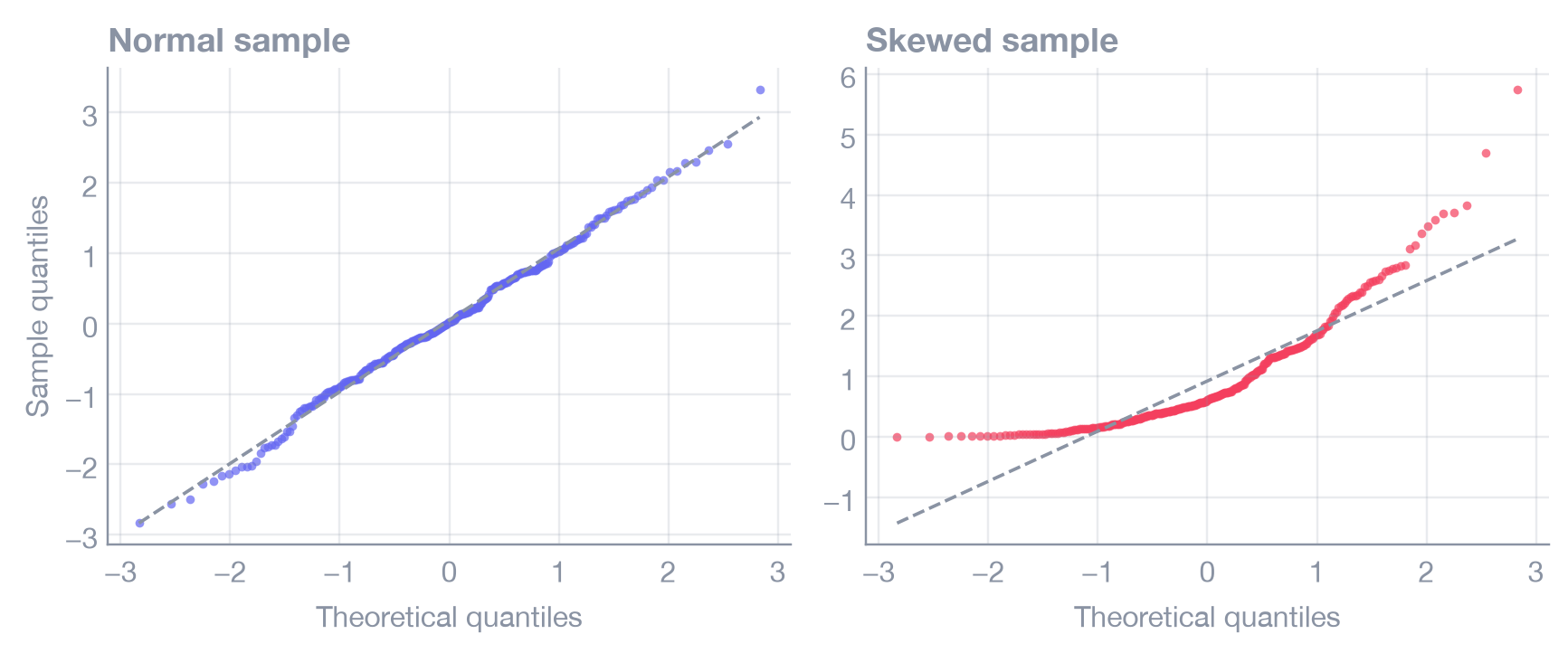
Summary
- \mu shifts the curve, \sigma stretches it, and the area always equals 1.
- About 68%, 95% and 99.7% of values fall within 1, 2 and 3 standard deviations.
- Use Q–Q plots, not just histograms, to check normality.