View Data Simulator
import numpy as np
import pandas as pd
rng=np.random.default_rng(1)
mat_df=pd.DataFrame({"week":np.arange(1,21)})
mat_df["revenue"]=85000+1800*mat_df["week"]+rng.normal(0,4500,20)Every worked example follows one contract:
The chart is always visible. View Data Simulator and View Plot Code expand and collapse independently. This lets a beginner focus on the picture first and inspect reproducible Python when ready.
Distribution, comparison, relationship, time-series, experimentation, multivariate, model-diagnostic, geographic and interactive visualization using Matplotlib, Seaborn, Plotly and Bokeh, plus guidance on modern alternatives.
Matplotlib is the low-level foundation and is commonly static-first. Seaborn builds statistical graphics on Matplotlib. Plotly and Bokeh make browser interaction—hover, zoom, selection and widgets—a central strength. Matplotlib can also use interactive backends, so “Matplotlib is never interactive” is not technically correct.
Company question: How is weekly revenue changing?
import numpy as np
import pandas as pd
rng=np.random.default_rng(1)
mat_df=pd.DataFrame({"week":np.arange(1,21)})
mat_df["revenue"]=85000+1800*mat_df["week"]+rng.normal(0,4500,20)import matplotlib.pyplot as plt
fig,ax=plt.subplots(figsize=(8,4))
ax.plot(mat_df["week"],mat_df["revenue"],marker="o")
ax.set(title="Weekly Revenue",xlabel="Week",ylabel="Revenue ($)")
fig.tight_layout(); plt.show()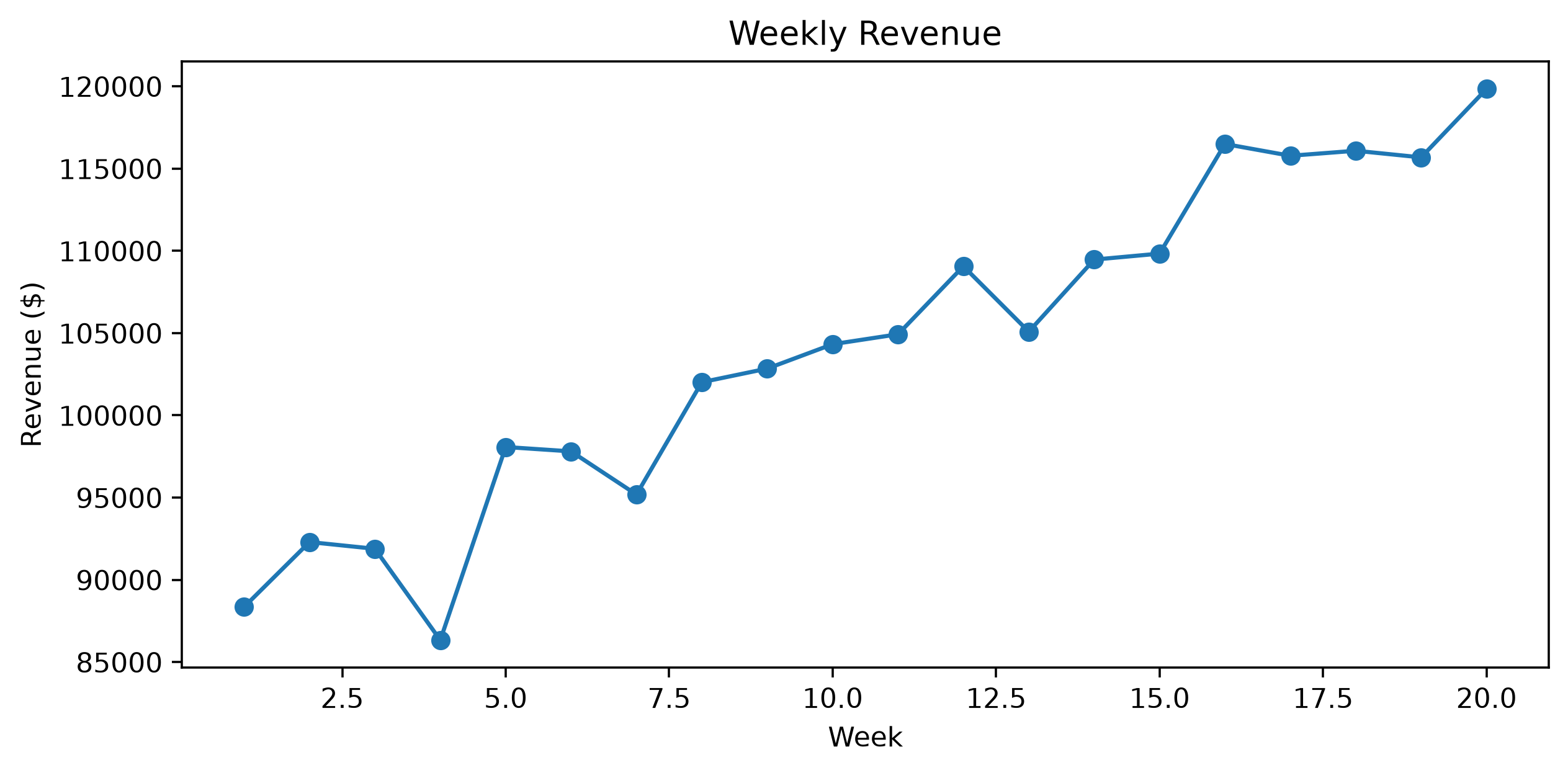
Best for: custom static analytical figures, reports, annotations and fine control.
Company question: How does revenue differ across segments?
import numpy as np
import pandas as pd
rng=np.random.default_rng(2)
seg=rng.choice(["Consumer","SMB","Enterprise"],900,p=[.55,.3,.15])
base=pd.Series(seg).map({"Consumer":70,"SMB":125,"Enterprise":220}).to_numpy()
sns_df=pd.DataFrame({"segment":seg,"revenue":np.maximum(5,base+rng.normal(0,32,900))})import matplotlib.pyplot as plt
import seaborn as sns
fig,ax=plt.subplots(figsize=(7.5,4))
sns.boxplot(data=sns_df,x="segment",y="revenue",ax=ax)
ax.set(title="Monthly Revenue by Segment",ylabel="Revenue ($)")
fig.tight_layout(); plt.show()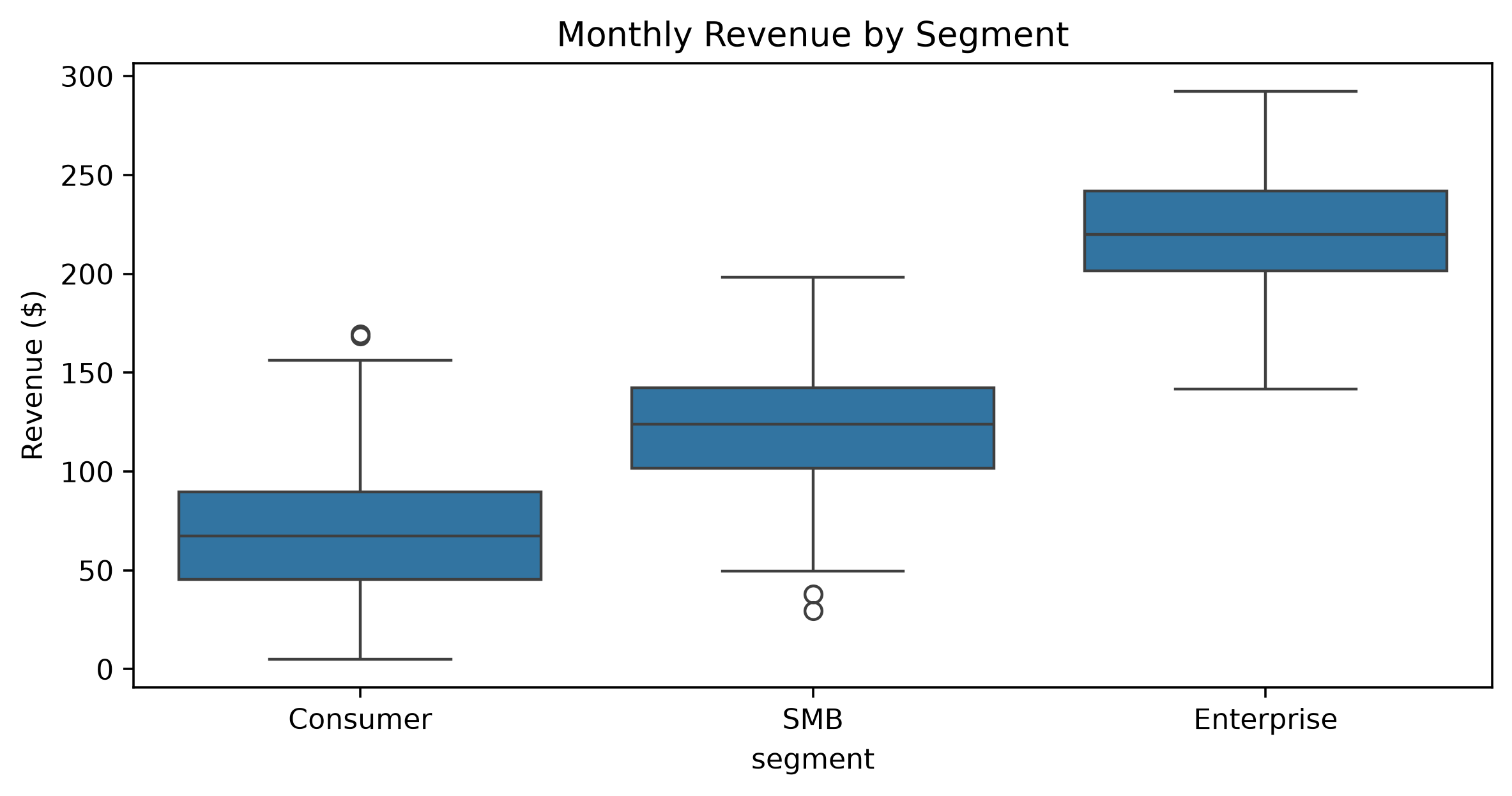
Best for: EDA, grouped distributions, statistical comparisons and regression views.
Company question: Which individual customers sit behind the overall pattern?
import numpy as np
import pandas as pd
rng=np.random.default_rng(3); n=650
px_df=pd.DataFrame({"customer_id":np.arange(10001,10001+n),"segment":rng.choice(["Consumer","SMB","Enterprise"],n,p=[.55,.3,.15]),"sessions":rng.poisson(9,n)+1,"tickets":rng.poisson(1.5,n)})
px_df["revenue"]=25+5.5*px_df["sessions"]+px_df["segment"].map({"Consumer":0,"SMB":40,"Enterprise":110})+rng.normal(0,25,n)import plotly.express as px
fig=px.scatter(px_df,x="sessions",y="revenue",color="segment",size="tickets",hover_data=["customer_id"],title="Interactive Customer Explorer")
fig.show()Hover, zoom, pan, select and toggle legend groups directly in the rendered chart.
Company question: Can an analyst inspect and zoom into customers?
import numpy as np
import pandas as pd
rng=np.random.default_rng(4); n=500
bk_df=pd.DataFrame({"customer_id":np.arange(1,n+1),"sessions":rng.poisson(10,n)+1})
bk_df["revenue"]=(35+6*bk_df["sessions"]+rng.normal(0,30,n)).clip(5)from bokeh.plotting import figure,show
from bokeh.models import ColumnDataSource,HoverTool
source=ColumnDataSource(bk_df)
p=figure(width=800,height=380,title="Bokeh: Revenue vs Sessions",tools="pan,wheel_zoom,box_zoom,reset")
p.scatter(x="sessions",y="revenue",source=source,size=7,alpha=.45)
p.add_tools(HoverTool(tooltips=[("Customer","@customer_id"),("Revenue","@revenue{0.0}")]))
show(p)Bokeh is especially useful for linked selections, widgets and browser applications.
Company question: What does monthly customer revenue look like?
import numpy as np
import pandas as pd
rng=np.random.default_rng(10)
hist_df=pd.DataFrame({"revenue":rng.lognormal(4.35,.62,2500)})import matplotlib.pyplot as plt
fig,ax=plt.subplots(figsize=(8,4)); ax.hist(hist_df["revenue"],bins=38,edgecolor="white")
ax.set(title="Distribution of Monthly Revenue",xlabel="Revenue ($)",ylabel="Customers"); fig.tight_layout(); plt.show()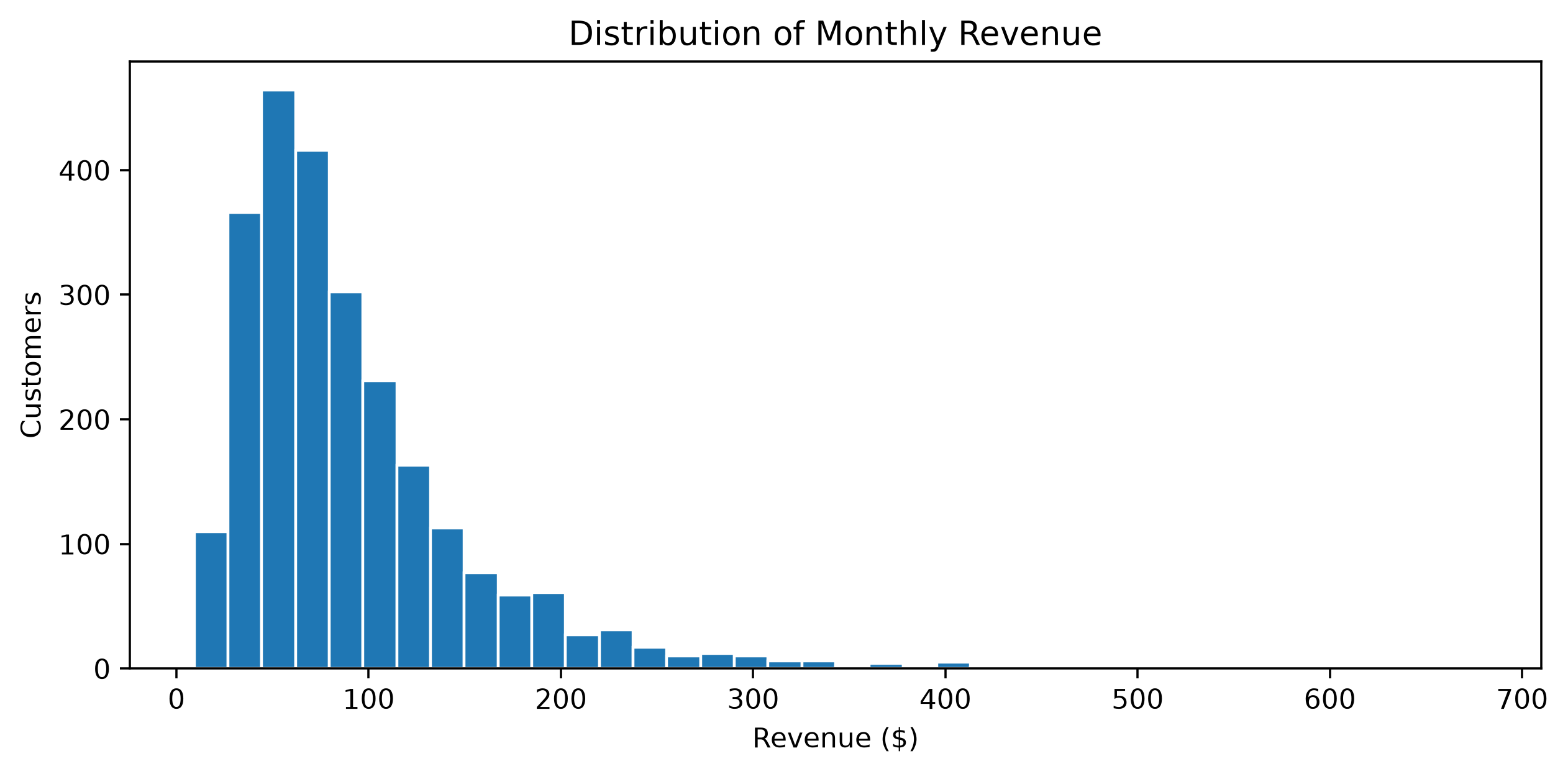
Company question: Do segments have differently shaped revenue distributions?
import numpy as np
import pandas as pd
rng=np.random.default_rng(11)
kde_df=pd.concat([pd.DataFrame({"segment":s,"revenue":rng.lognormal(mu,sd,700)}) for s,mu,sd in [("Consumer",4,.55),("SMB",4.55,.48),("Enterprise",5.25,.40)]],ignore_index=True)import matplotlib.pyplot as plt
import seaborn as sns
fig,ax=plt.subplots(figsize=(8,4)); sns.kdeplot(data=kde_df,x="revenue",hue="segment",common_norm=False,ax=ax)
ax.set(title="Revenue Density by Segment",xlabel="Revenue ($)"); fig.tight_layout(); plt.show()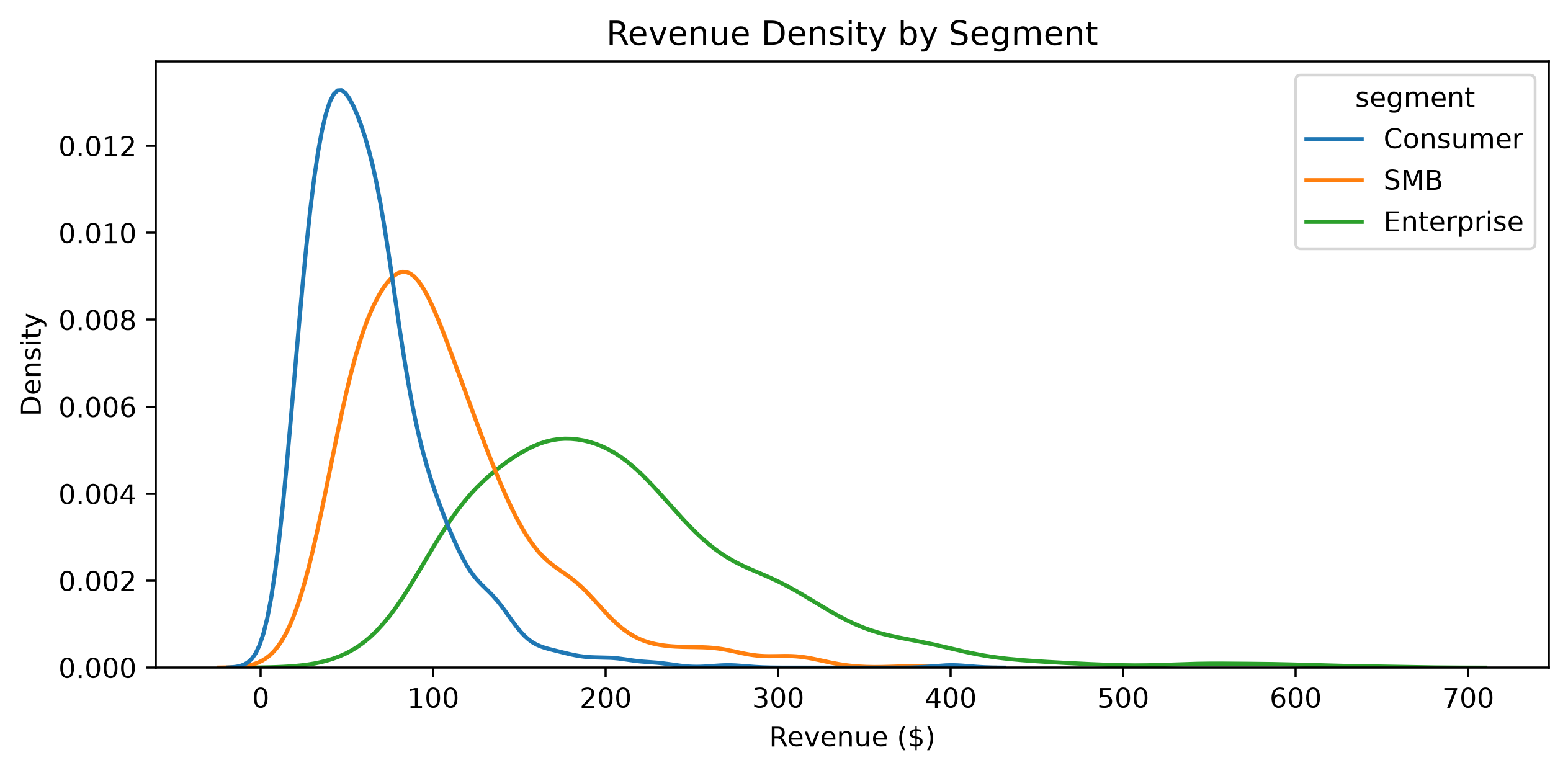
KDE is estimated smoothness. Do not interpret every bump as a real population mode.
Company question: What fraction of each segment falls below a revenue threshold?
import numpy as np
import pandas as pd
rng=np.random.default_rng(12)
ecdf_df=pd.concat([pd.DataFrame({"segment":s,"revenue":np.maximum(5,rng.normal(c,c*.28,600))}) for s,c in [("Consumer",65),("SMB",125),("Enterprise",225)]],ignore_index=True)import matplotlib.pyplot as plt
import seaborn as sns
fig,ax=plt.subplots(figsize=(8,4)); sns.ecdfplot(data=ecdf_df,x="revenue",hue="segment",ax=ax)
ax.set(title="ECDF of Revenue by Segment",xlabel="Revenue ($)",ylabel="Fraction ≤ x"); fig.tight_layout(); plt.show()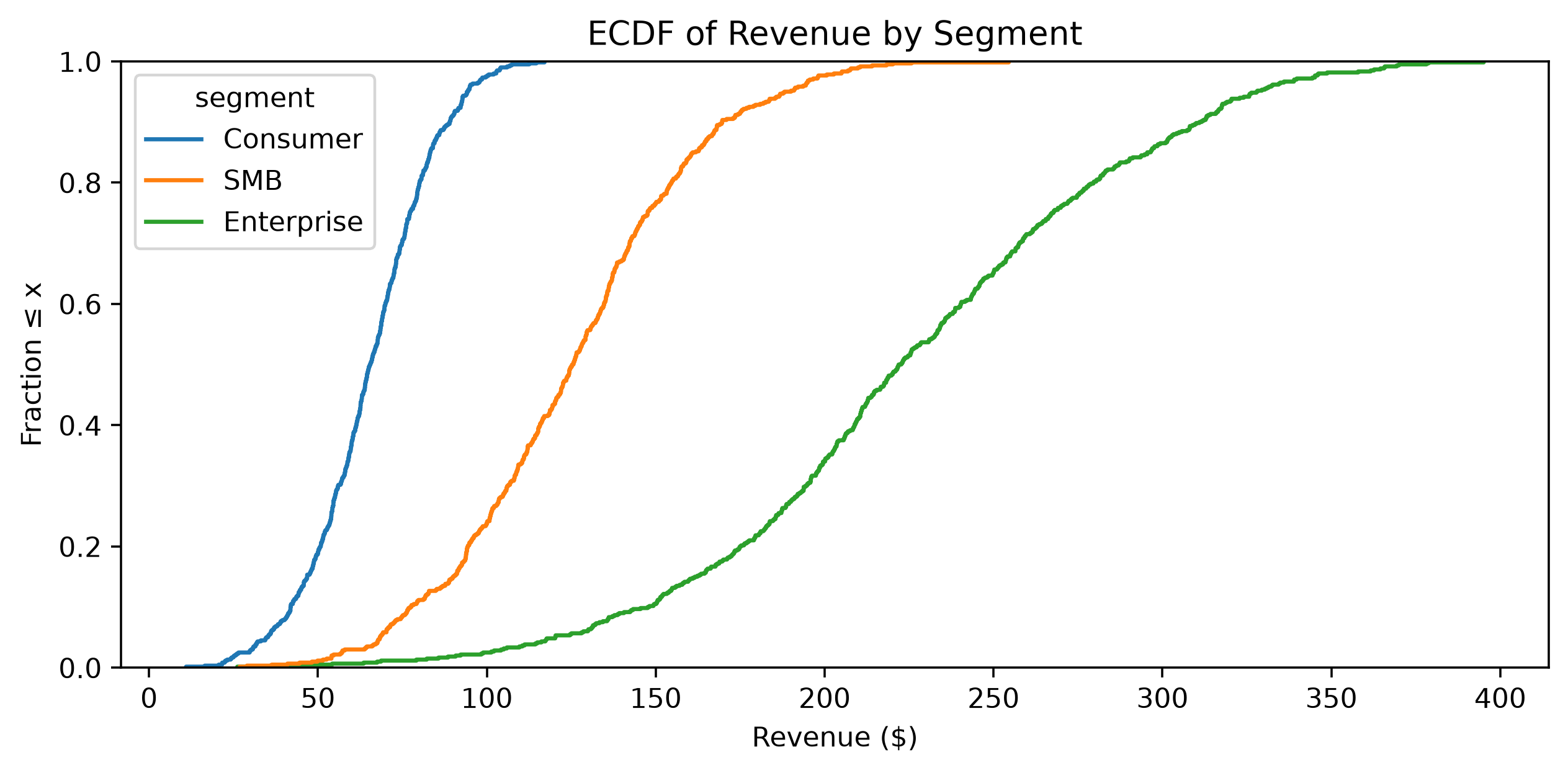
The ECDF has no histogram-bin choice and makes percentile questions direct.
Company question: Which segment has the widest revenue distribution?
import numpy as np
import pandas as pd
rng=np.random.default_rng(13)
box_df=pd.DataFrame({"segment":np.repeat(["Consumer","SMB","Enterprise"],500)})
c=box_df["segment"].map({"Consumer":70,"SMB":130,"Enterprise":230}).to_numpy(); box_df["revenue"]=np.maximum(5,c+rng.normal(0,c*.25))import matplotlib.pyplot as plt
import seaborn as sns
fig,ax=plt.subplots(figsize=(7.5,4)); sns.boxplot(data=box_df,x="segment",y="revenue",ax=ax)
ax.set(title="Revenue by Segment",ylabel="Revenue ($)"); fig.tight_layout(); plt.show()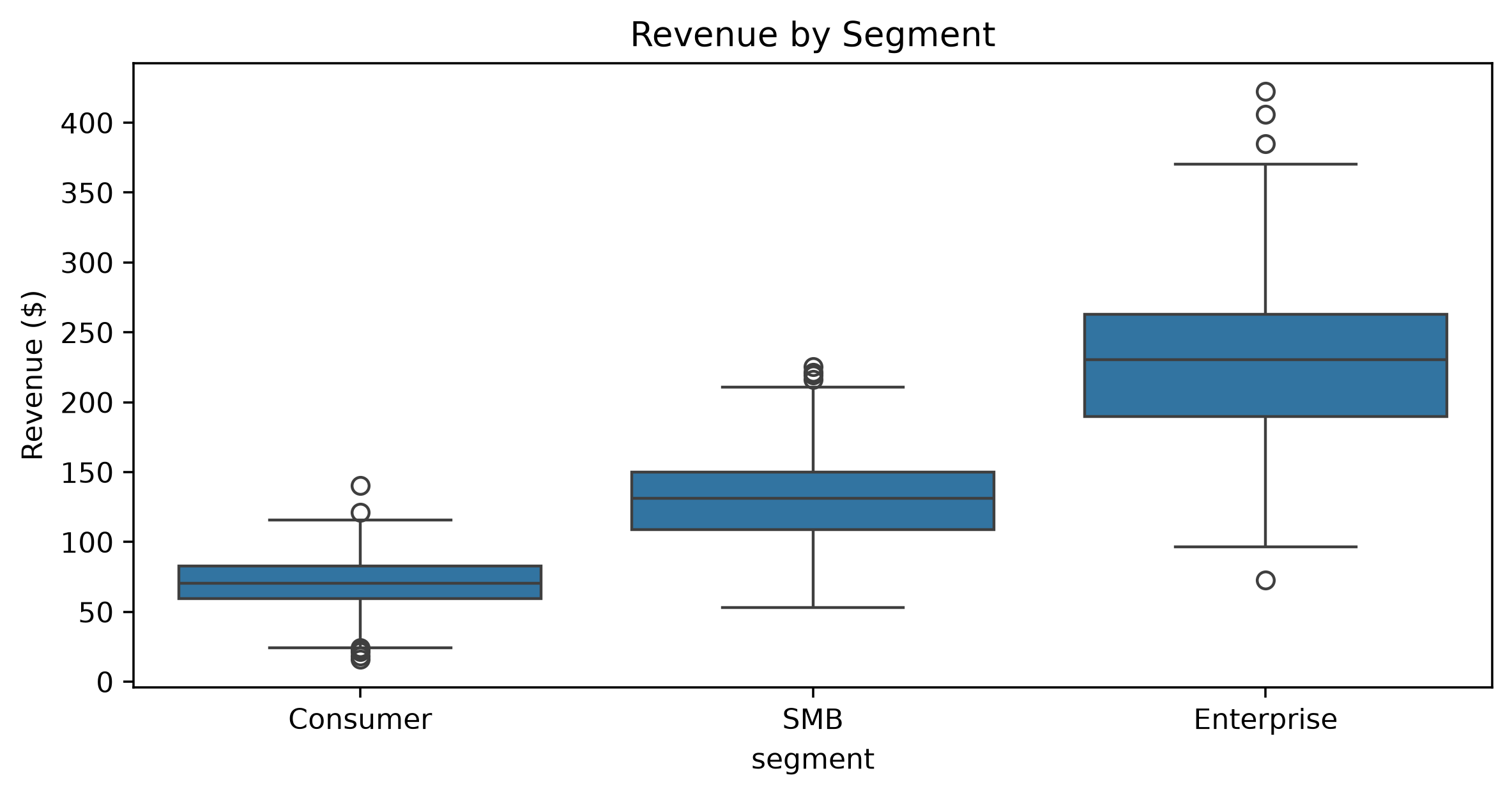
Box plots summarize median, quartiles, spread and potential outliers.
Company question: Do plans differ in the whole engagement distribution?
import numpy as np
import pandas as pd
rng=np.random.default_rng(14)
violin_df=pd.DataFrame({"plan":np.repeat(["Standard","Premium"],220),"engagement":np.r_[rng.beta(2.2,4,220),rng.beta(4,2.4,220)]})import matplotlib.pyplot as plt
import seaborn as sns
fig,ax=plt.subplots(figsize=(7,4)); sns.violinplot(data=violin_df,x="plan",y="engagement",inner=None,ax=ax); sns.stripplot(data=violin_df,x="plan",y="engagement",alpha=.28,size=2.5,ax=ax)
ax.set_title("Engagement Distribution by Plan"); fig.tight_layout(); plt.show()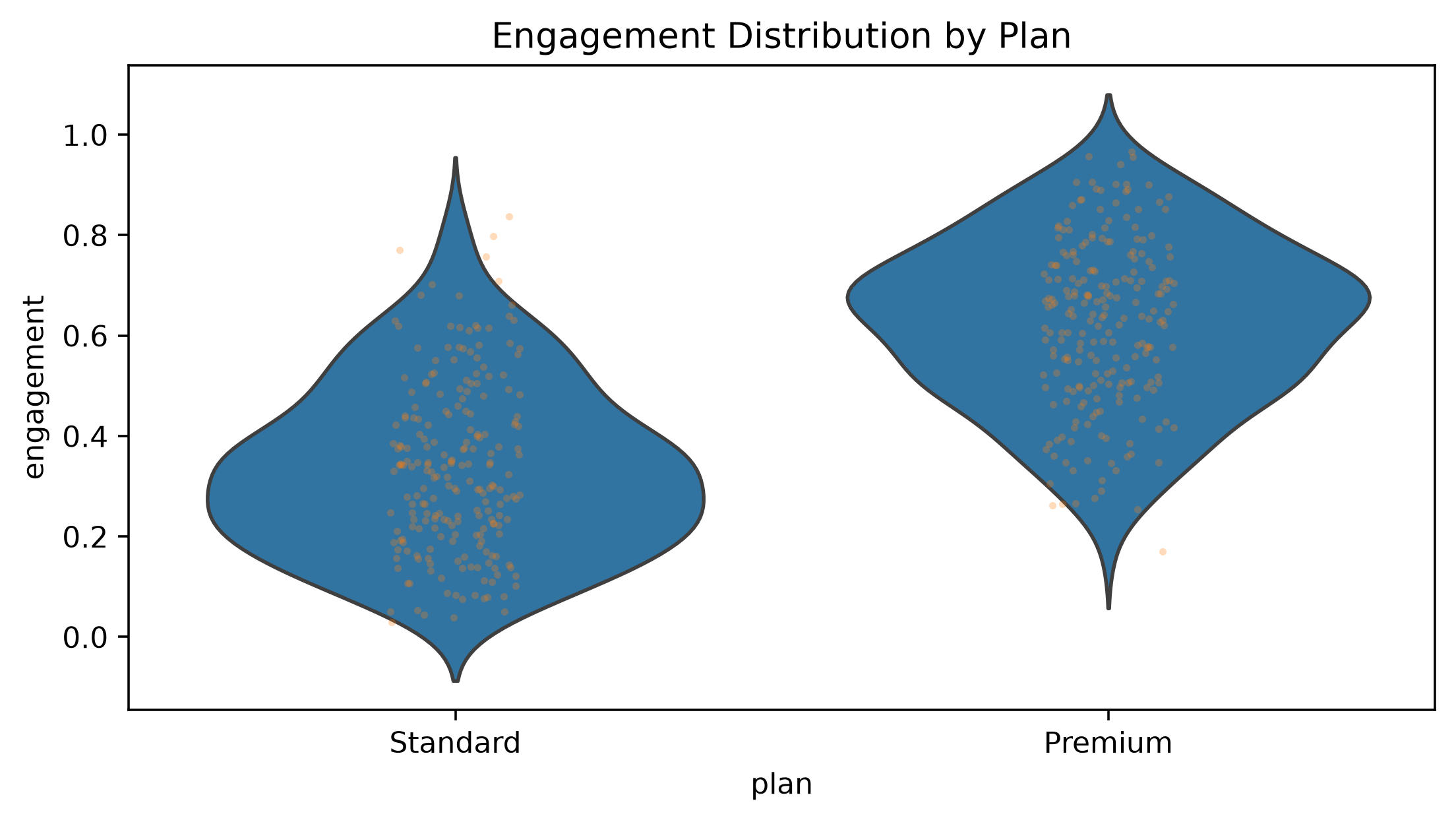
Use violin plots when distribution shape itself matters.
Company question: Which segment has the highest churn rate?
import numpy as np
import pandas as pd
rng=np.random.default_rng(15); n=2400
seg=rng.choice(["Consumer","SMB","Enterprise"],n,p=[.55,.3,.15]); prob=pd.Series(seg).map({"Consumer":.19,"SMB":.13,"Enterprise":.08}).to_numpy(); raw=pd.DataFrame({"segment":seg,"churn":rng.binomial(1,prob)}); bar_df=raw.groupby("segment",as_index=False).agg(churn_rate=("churn","mean"))import matplotlib.pyplot as plt
fig,ax=plt.subplots(figsize=(7,4)); ax.bar(bar_df["segment"],bar_df["churn_rate"]); ax.set(title="Churn Rate by Segment",ylabel="Churn rate",ylim=(0,bar_df["churn_rate"].max()*1.25)); fig.tight_layout(); plt.show()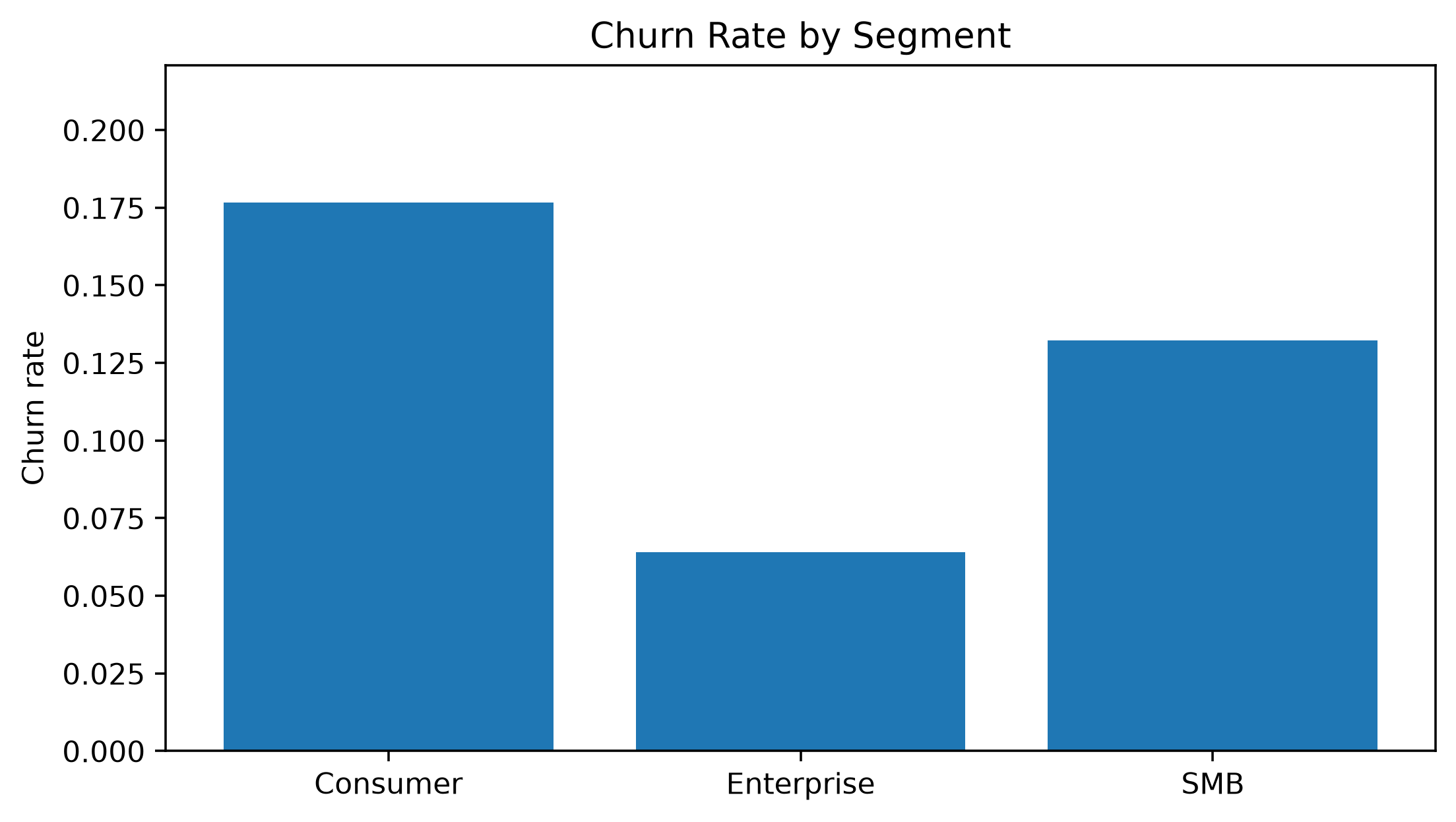
Company question: How many customers use each device?
import numpy as np
import pandas as pd
rng=np.random.default_rng(16)
count_df=pd.DataFrame({"device":rng.choice(["Web","iOS","Android"],1800,p=[.46,.28,.26]),"segment":rng.choice(["Consumer","SMB","Enterprise"],1800,p=[.56,.3,.14])})import matplotlib.pyplot as plt
import seaborn as sns
fig,ax=plt.subplots(figsize=(8,4)); sns.countplot(data=count_df,x="device",hue="segment",ax=ax); ax.set(title="Customer Count by Device and Segment",ylabel="Customers"); fig.tight_layout(); plt.show()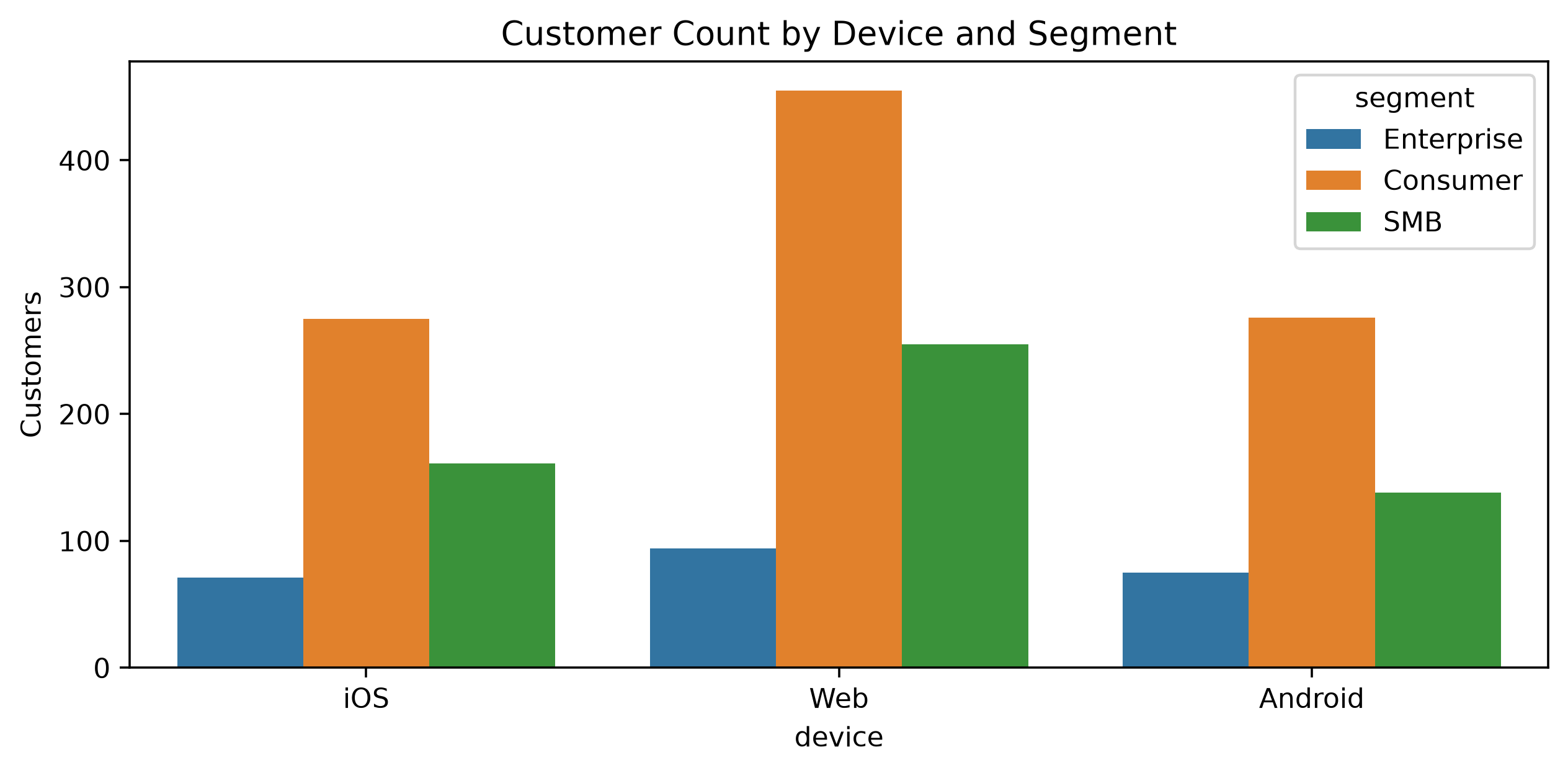
Inspect sample size before interpreting subgroup metrics.
Company question: Do more sessions correspond to more revenue?
import numpy as np
import pandas as pd
rng=np.random.default_rng(17); n=1300
scatter_df=pd.DataFrame({"sessions":rng.poisson(10,n)+1}); scatter_df["revenue"]=(30+6.2*scatter_df["sessions"]+rng.normal(0,32,n)).clip(5)import matplotlib.pyplot as plt
fig,ax=plt.subplots(figsize=(8,4.5)); ax.scatter(scatter_df["sessions"],scatter_df["revenue"],alpha=.25,s=18); ax.set(title="Sessions vs Monthly Revenue",xlabel="Sessions",ylabel="Revenue ($)"); fig.tight_layout(); plt.show()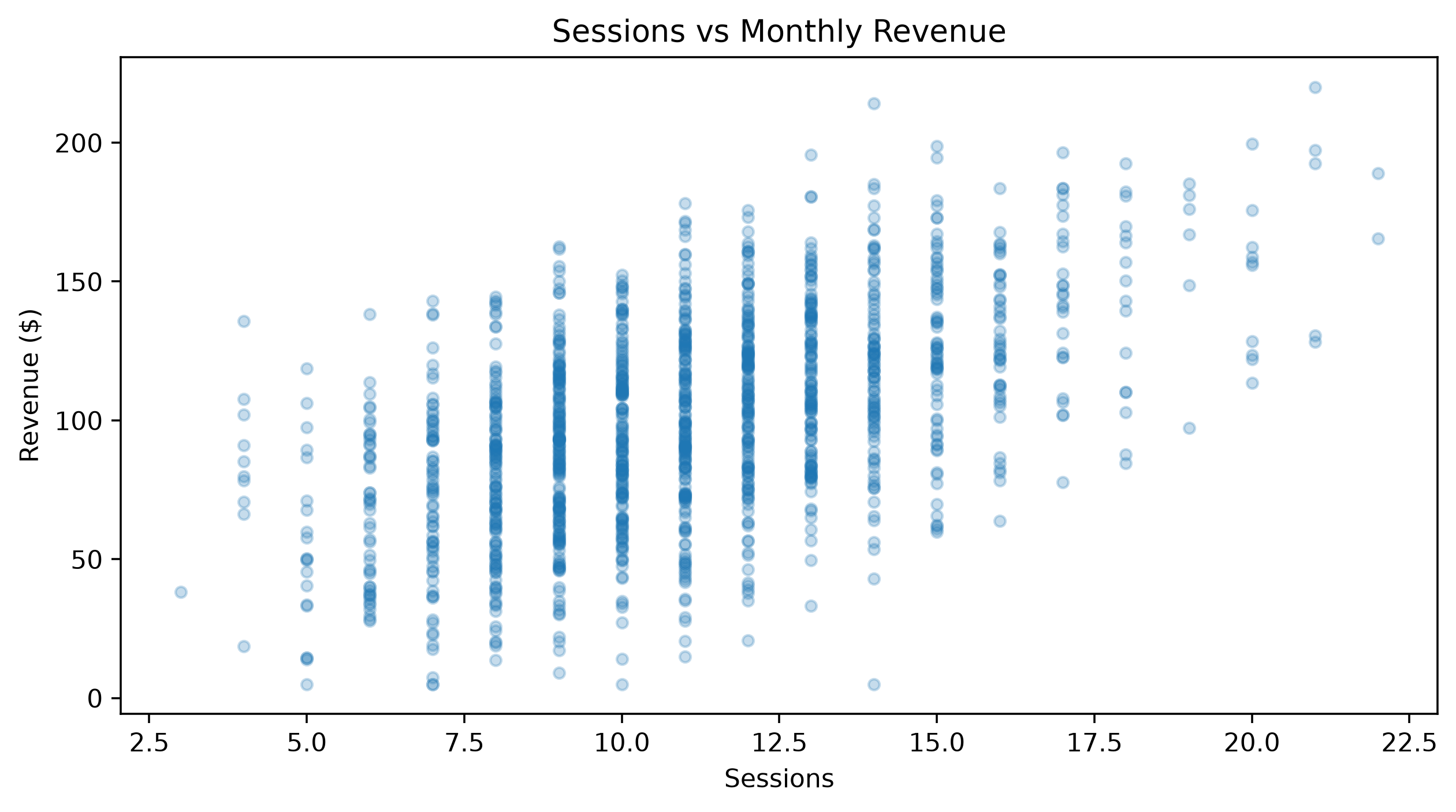
Look for direction, curvature, clusters, changing variance and outliers.
Company question: What average relationship is visible?
import numpy as np
import pandas as pd
rng=np.random.default_rng(18); n=900
reg_df=pd.DataFrame({"sessions":rng.uniform(1,25,n)}); reg_df["revenue"]=25+5.8*reg_df["sessions"]+rng.normal(0,28,n)import matplotlib.pyplot as plt
import seaborn as sns
fig,ax=plt.subplots(figsize=(8,4.5)); sns.regplot(data=reg_df,x="sessions",y="revenue",scatter_kws={"alpha":.18,"s":18},ax=ax); ax.set_title("Average Revenue Trend with Sessions"); fig.tight_layout(); plt.show()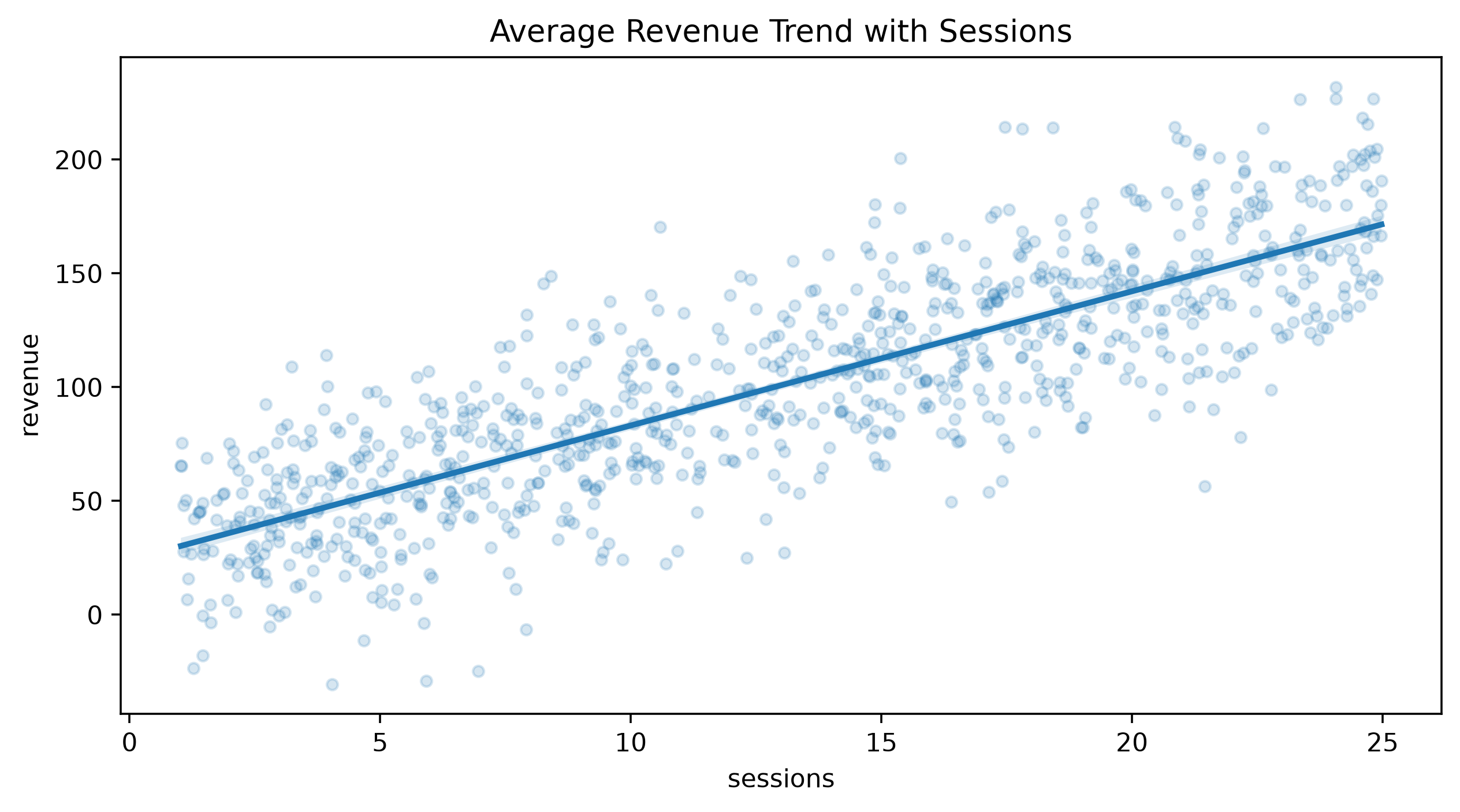
A fitted trend summarizes association, not causation.
Company question: How do two telemetry measures relate across 75,000 events?
import numpy as np
rng=np.random.default_rng(19); n=75000
hex_x=rng.normal(size=n); hex_y=.65*hex_x+rng.normal(0,.75,n)import matplotlib.pyplot as plt
fig,ax=plt.subplots(figsize=(7,5)); hb=ax.hexbin(hex_x,hex_y,gridsize=45,mincnt=1); fig.colorbar(hb,ax=ax,label="Observations"); ax.set(title="Density Hidden by Overplotting",xlabel="Feature X",ylabel="Feature Y"); fig.tight_layout(); plt.show()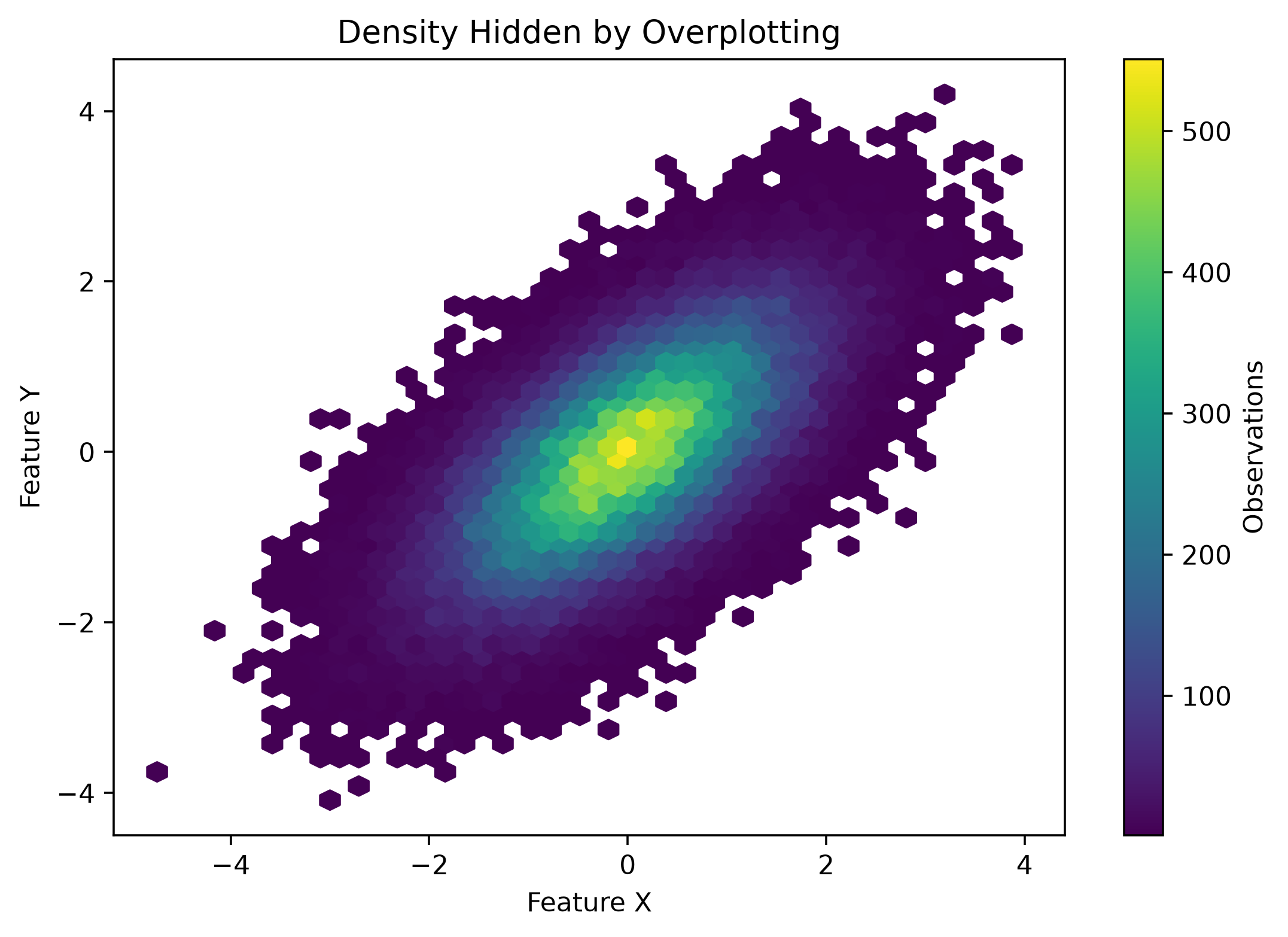
Use hexbin, density, sampling or rasterization when scatter points become an opaque cloud.
Company question: Is revenue rising beneath daily noise?
import numpy as np
import pandas as pd
rng=np.random.default_rng(20); dates=pd.date_range("2026-01-01",periods=220,freq="D"); t=np.arange(220)
line_df=pd.DataFrame({"date":dates,"revenue":120000+180*t+10000*np.sin(2*np.pi*t/7)+rng.normal(0,6500,220)}); line_df["rolling_14d"]=line_df["revenue"].rolling(14).mean()import matplotlib.pyplot as plt
fig,ax=plt.subplots(figsize=(10,4)); ax.plot(line_df["date"],line_df["revenue"],alpha=.35,label="Daily"); ax.plot(line_df["date"],line_df["rolling_14d"],linewidth=2,label="14-day mean"); ax.set(title="Revenue: Noise vs Trend",ylabel="Revenue ($)"); ax.legend(); fig.tight_layout(); plt.show()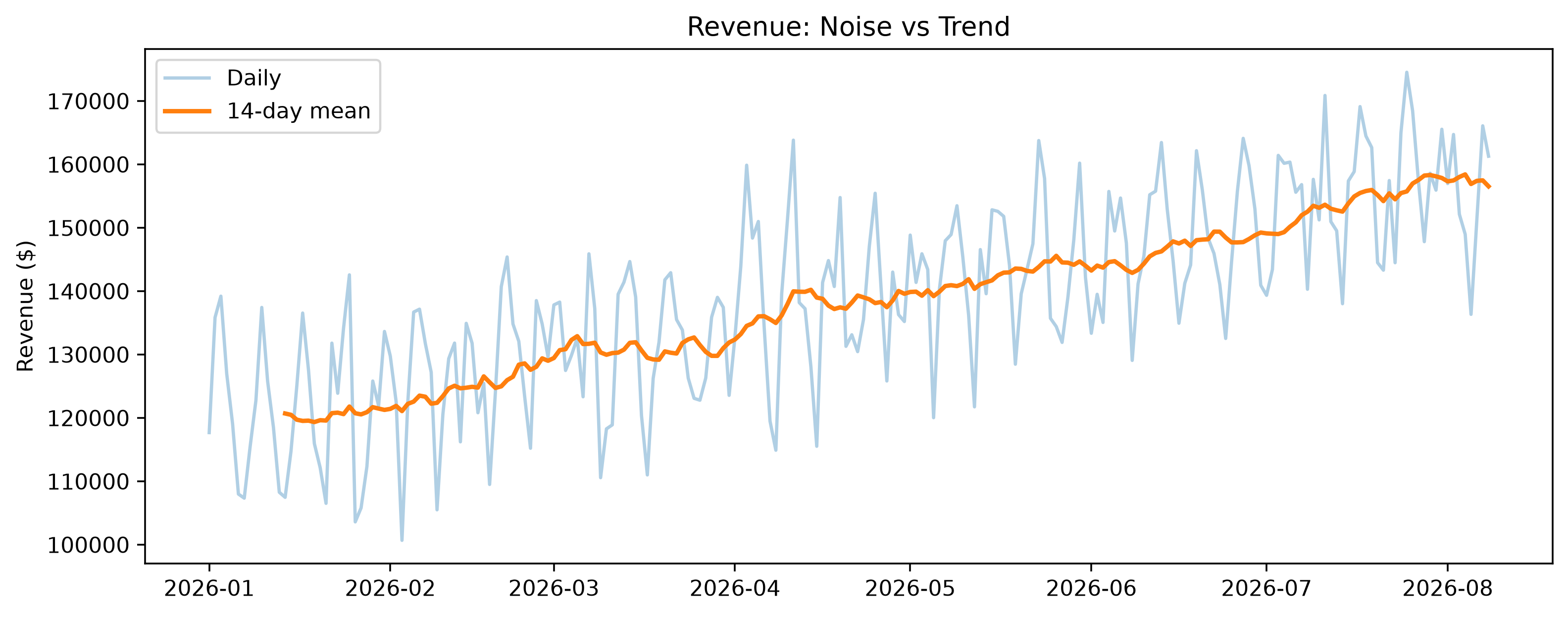
Chronology is information. Keep time on an ordered axis.
Company question: Is a conversion trend larger than its uncertainty?
import numpy as np
import pandas as pd
rng=np.random.default_rng(21); w=np.arange(1,21); est=.12+.002*w+rng.normal(0,.004,20); se=np.linspace(.012,.006,20)
band_df=pd.DataFrame({"week":w,"estimate":est,"lower":est-1.96*se,"upper":est+1.96*se})import matplotlib.pyplot as plt
fig,ax=plt.subplots(figsize=(8,4)); ax.plot(band_df["week"],band_df["estimate"],linewidth=2); ax.fill_between(band_df["week"],band_df["lower"],band_df["upper"],alpha=.2); ax.set(title="Conversion Estimate with 95% Band",xlabel="Week",ylabel="Conversion rate"); fig.tight_layout(); plt.show()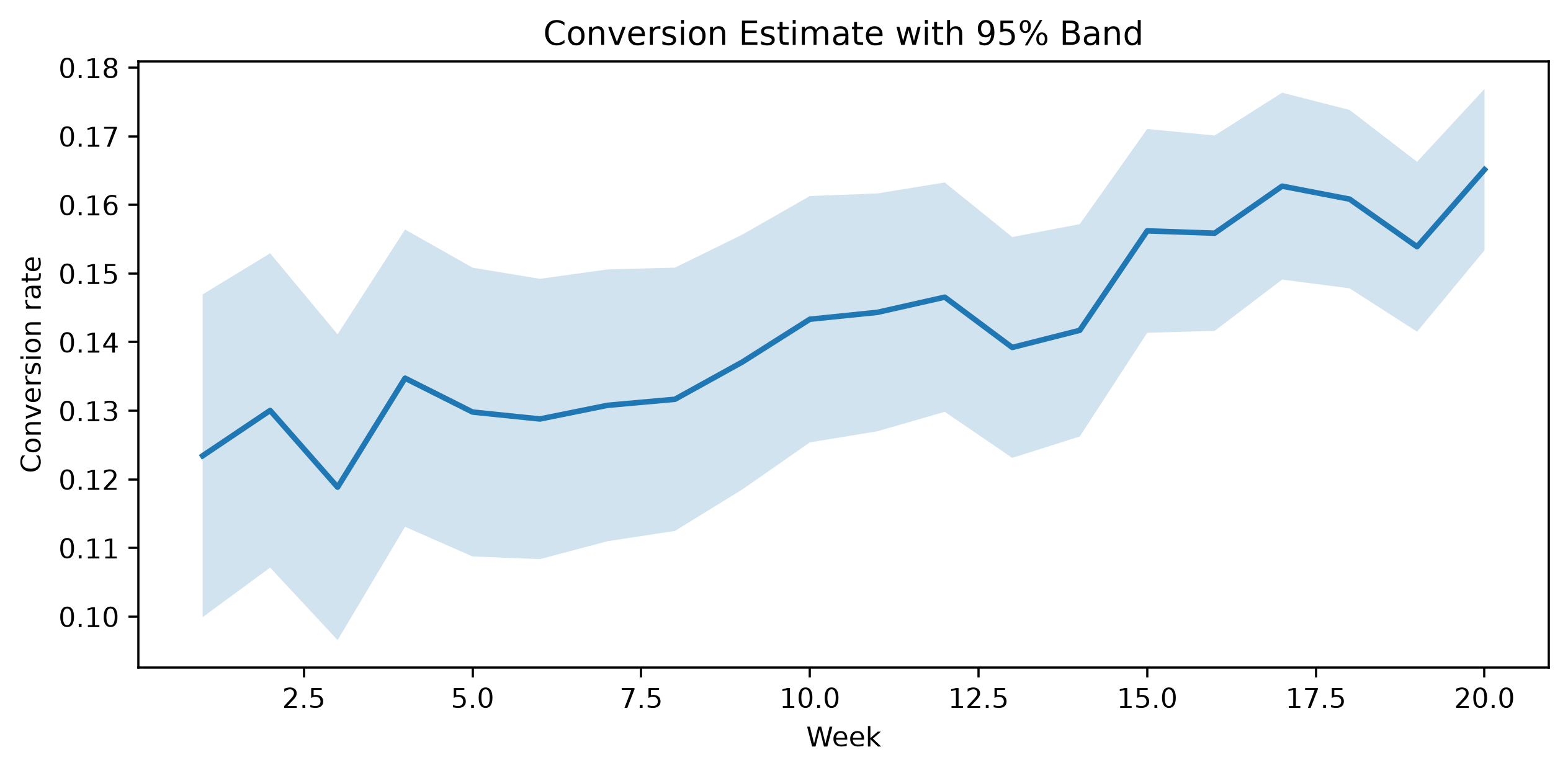
Use uncertainty bands for forecasts, experiments and estimated quantities.
Company question: How do A/B variants compare with uncertainty?
import numpy as np
import pandas as pd
exp_df=pd.DataFrame({"variant":["Control","Treatment A","Treatment B"],"conversion":[.100,.112,.107],"n":[12000,11850,12120]}); exp_df["se"]=np.sqrt(exp_df["conversion"]*(1-exp_df["conversion"])/exp_df["n"]); exp_df["ci95"]=1.96*exp_df["se"]import matplotlib.pyplot as plt
fig,ax=plt.subplots(figsize=(7,4)); ax.errorbar(exp_df["variant"],exp_df["conversion"],yerr=exp_df["ci95"],fmt="o",capsize=5); ax.set(title="Conversion ± 95% Approximate CI",ylabel="Conversion rate"); fig.tight_layout(); plt.show()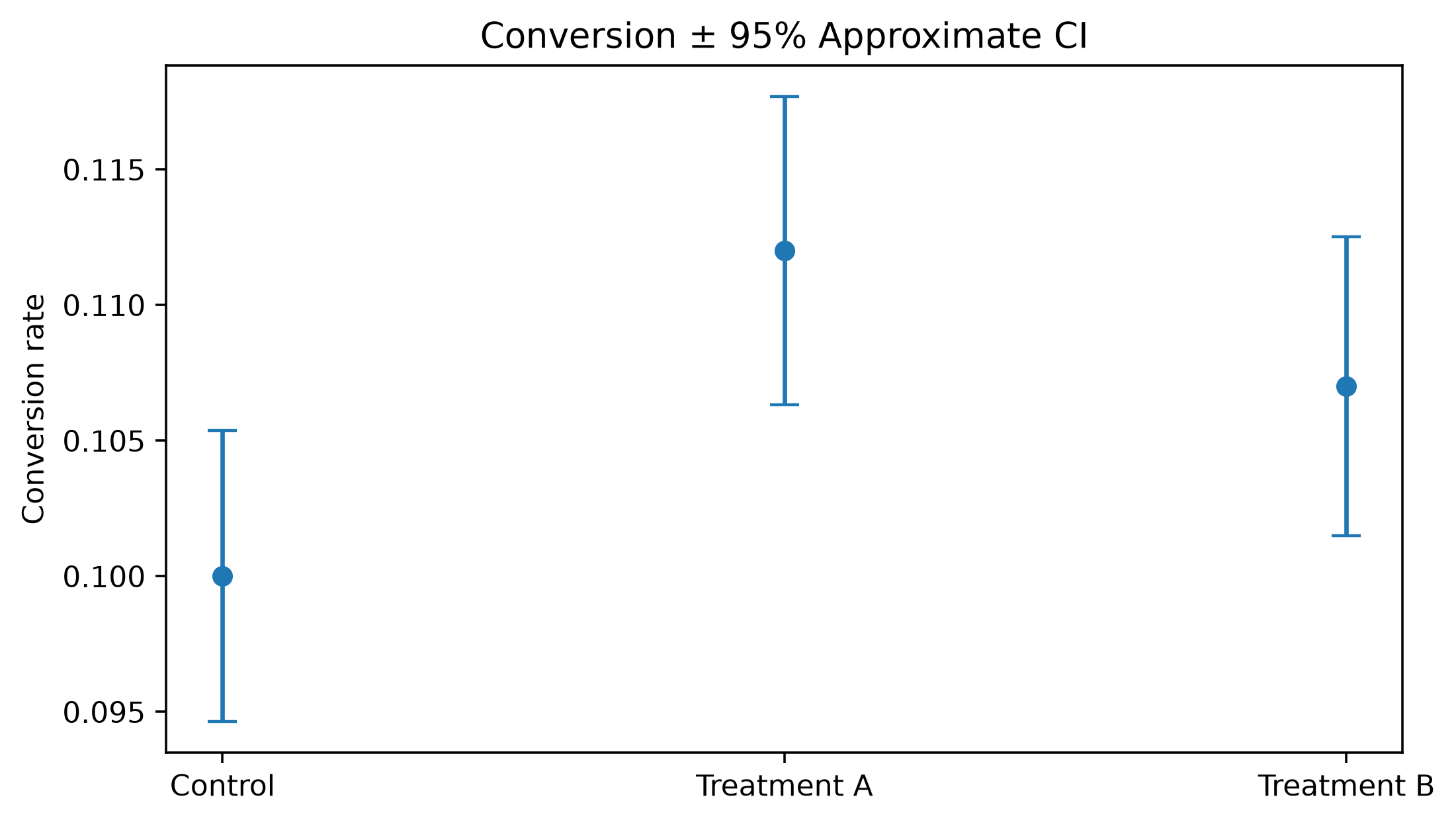
Effect magnitude and uncertainty belong in the same comparison.
Company question: Which numerical variables move together?
import numpy as np
import pandas as pd
rng=np.random.default_rng(22); n=1200
heat_df=pd.DataFrame({"sessions":rng.poisson(10,n)+1,"tenure":rng.integers(1,72,n),"tickets":rng.poisson(1.5,n)}); heat_df["revenue"]=25+6*heat_df["sessions"]+.6*heat_df["tenure"]+rng.normal(0,30,n); heat_df["satisfaction"]=np.clip(4.5-.28*heat_df["tickets"]+rng.normal(0,.5,n),1,5); corr=heat_df.corr(numeric_only=True)import matplotlib.pyplot as plt
import seaborn as sns
fig,ax=plt.subplots(figsize=(7,5)); sns.heatmap(corr,annot=True,fmt=".2f",center=0,ax=ax); ax.set_title("Correlation Matrix"); fig.tight_layout(); plt.show()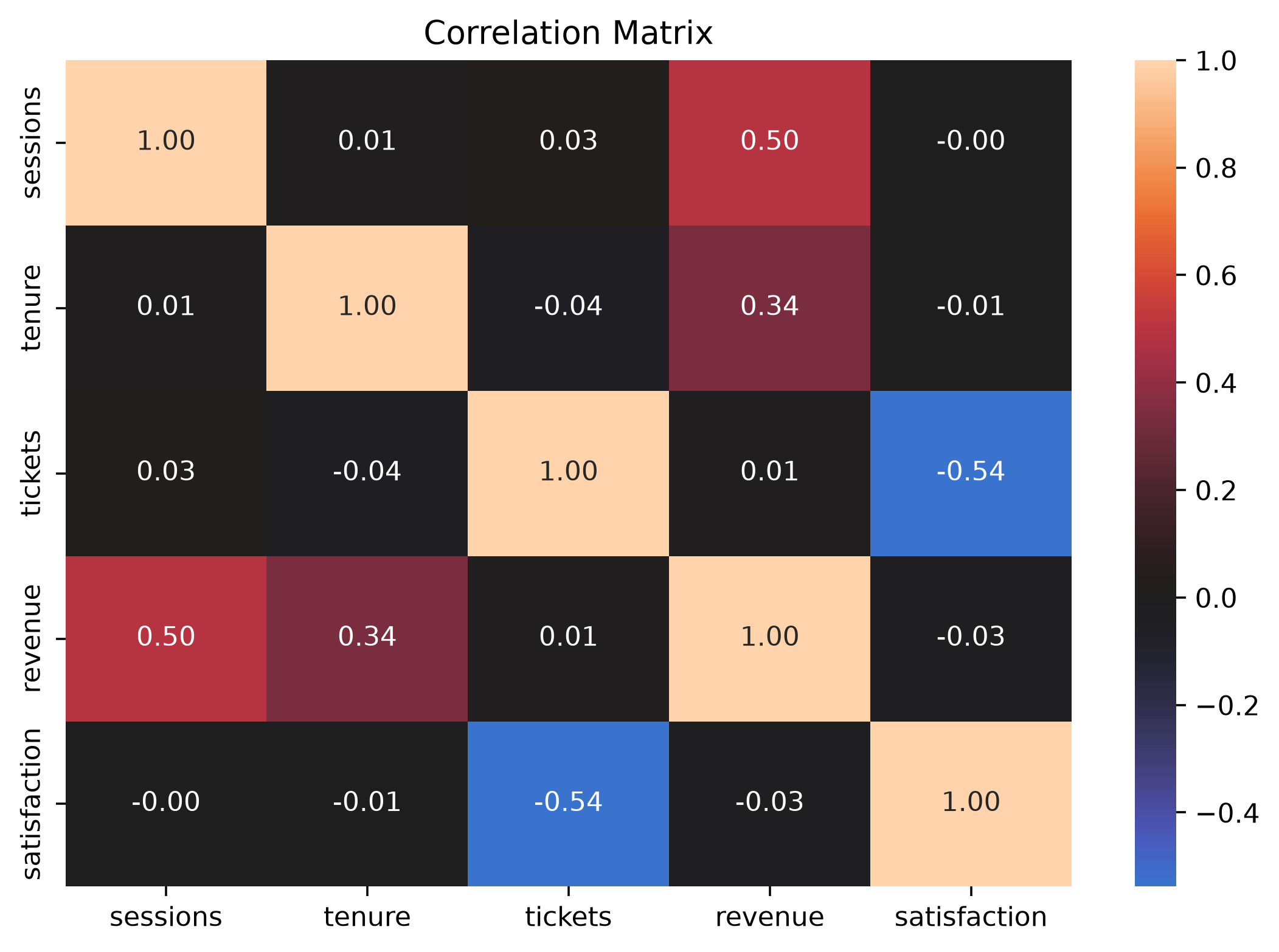
Correlation is a screening tool, not a causal map.
Company question: How do several customer measures relate at once?
import numpy as np
import pandas as pd
rng=np.random.default_rng(23); n=450
pair_df=pd.DataFrame({"segment":rng.choice(["Consumer","SMB","Enterprise"],n,p=[.55,.3,.15]),"sessions":rng.poisson(9,n)+1,"tenure":rng.integers(1,72,n),"satisfaction":np.clip(rng.normal(4,.65,n),1,5)}); pair_df["revenue"]=30+5.5*pair_df["sessions"]+pair_df["segment"].map({"Consumer":0,"SMB":40,"Enterprise":105})+rng.normal(0,25,n)import matplotlib.pyplot as plt
import seaborn as sns
g=sns.pairplot(pair_df,vars=["sessions","revenue","tenure","satisfaction"],hue="segment",corner=True); g.fig.suptitle("Multivariate Customer Overview",y=1.02); plt.show()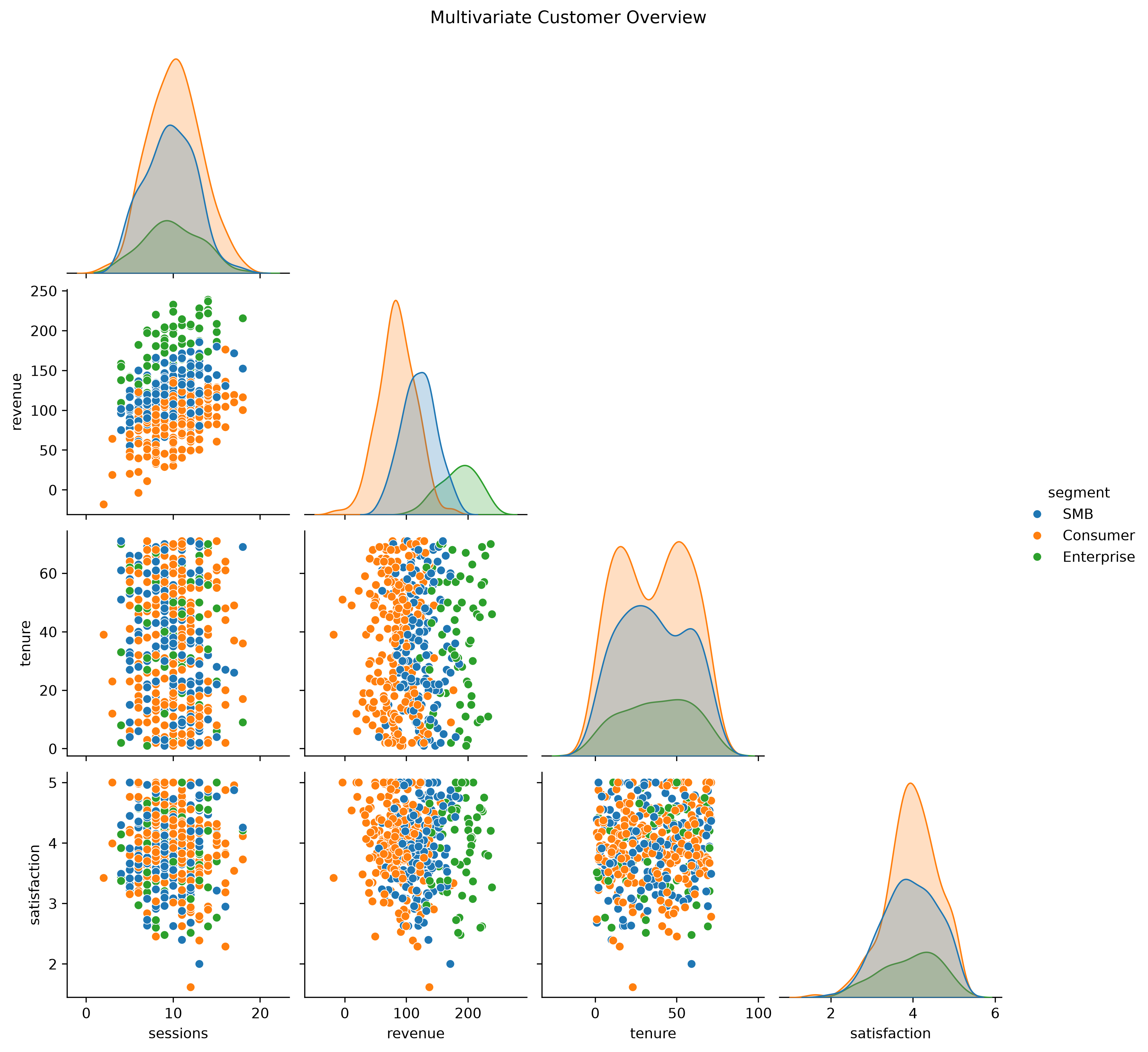
Pair plots are excellent for early EDA but become unwieldy as the number of variables grows.
Company question: Does a relationship change by segment?
import numpy as np
import pandas as pd
rng=np.random.default_rng(24); n=1000
facet_df=pd.DataFrame({"segment":rng.choice(["Consumer","SMB","Enterprise"],n,p=[.55,.3,.15]),"device":rng.choice(["Web","iOS","Android"],n),"sessions":rng.poisson(9,n)+1}); facet_df["revenue"]=25+5.8*facet_df["sessions"]+facet_df["segment"].map({"Consumer":0,"SMB":45,"Enterprise":110})+rng.normal(0,30,n)import matplotlib.pyplot as plt
import seaborn as sns
g=sns.relplot(data=facet_df,x="sessions",y="revenue",col="segment",hue="device",kind="scatter",alpha=.45,height=3.3); g.fig.suptitle("Sessions vs Revenue Across Segments",y=1.05); plt.show()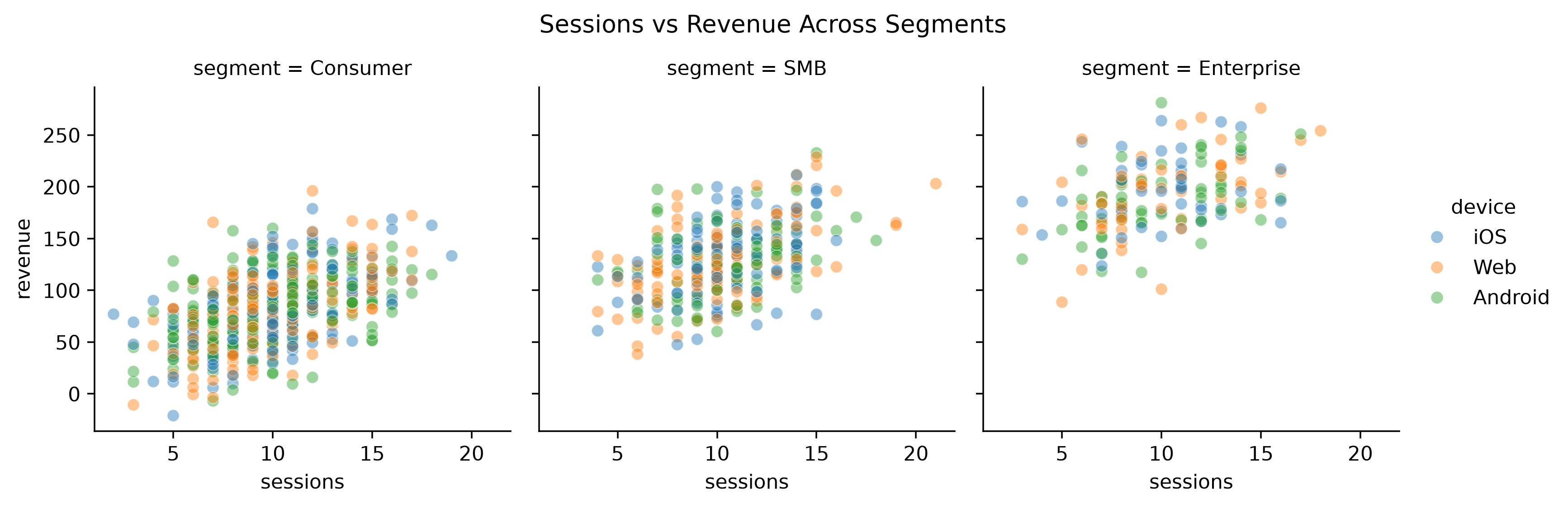
Small multiples often beat one overloaded plot with too many visual encodings.
Company question: Can an analyst inspect a long timeline around an incident?
import numpy as np
import pandas as pd
rng=np.random.default_rng(27); dates=pd.date_range("2025-01-01",periods=420,freq="D"); t=np.arange(420)
its_df=pd.DataFrame({"date":dates,"revenue":100000+120*t+8000*np.sin(2*np.pi*t/7)+rng.normal(0,5500,420)}); its_df["rolling_21d"]=its_df["revenue"].rolling(21).mean()import plotly.express as px
fig=px.line(its_df,x="date",y=["revenue","rolling_21d"],title="Interactive Revenue Timeline"); fig.update_xaxes(rangeslider_visible=True); fig.show()The range slider and zoom controls are valuable for campaigns, incidents and long monitoring windows.
Company question: Is the churn model missing positives or generating false alarms?
import numpy as np
rng=np.random.default_rng(30); n=2500
cm_y=rng.binomial(1,.18,n); cm_score=np.clip(.12+.55*cm_y+rng.normal(0,.22,n),0,1); cm_pred=(cm_score>=.5).astype(int)import matplotlib.pyplot as plt
from sklearn.metrics import confusion_matrix,ConfusionMatrixDisplay
cm=confusion_matrix(cm_y,cm_pred); ConfusionMatrixDisplay(cm,display_labels=["No churn","Churn"]).plot(); plt.title("Churn Classifier: Confusion Matrix"); plt.show()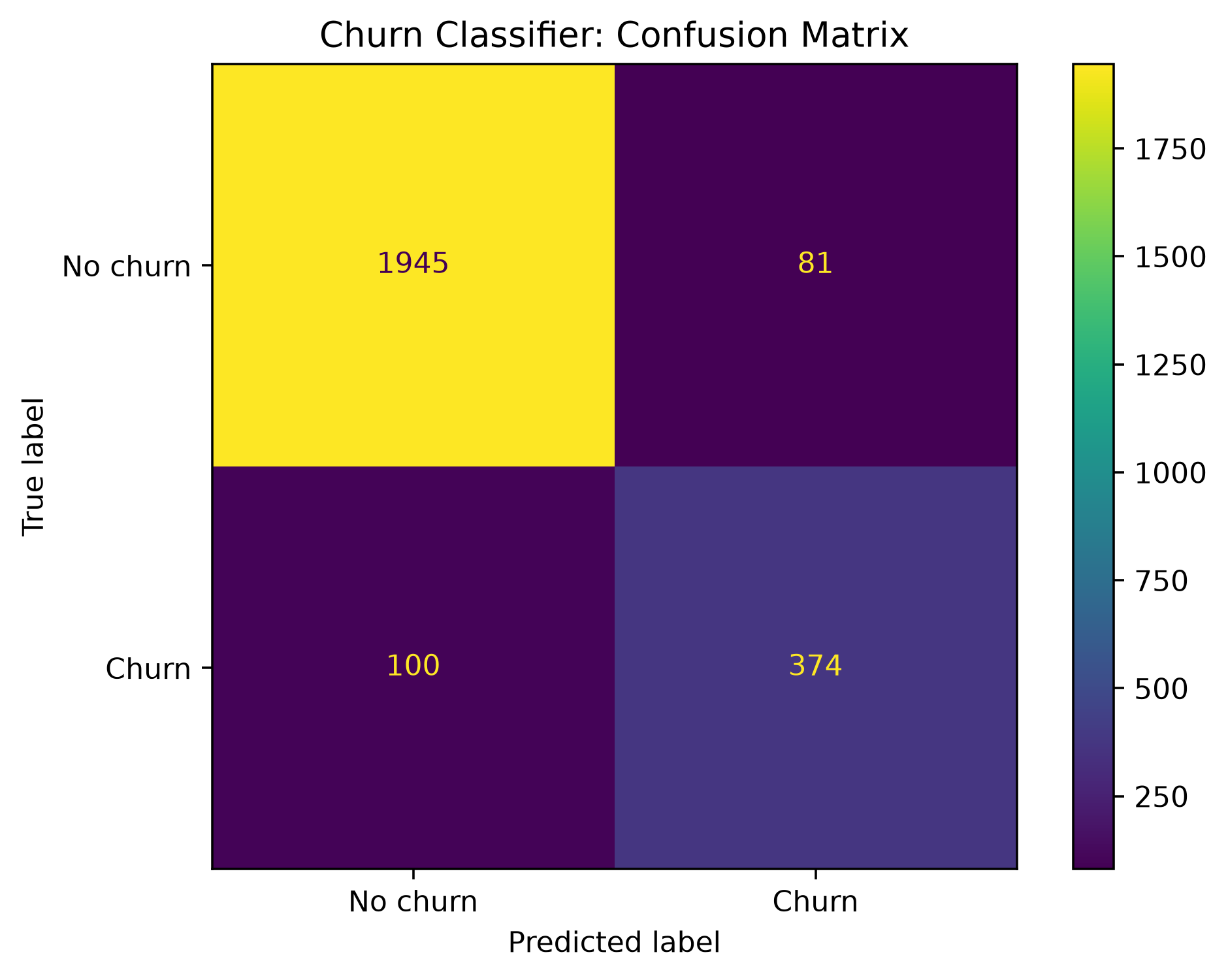
A confusion matrix shows which kind of error occurs, not merely how often the model is correct.
Company question: How well does the classifier separate classes?
import numpy as np
rng=np.random.default_rng(31); n=2800
roc_y=rng.binomial(1,.20,n); roc_score=np.clip(.10+.60*roc_y+rng.normal(0,.24,n),0,1)import matplotlib.pyplot as plt
from sklearn.metrics import roc_curve,roc_auc_score
fpr,tpr,_=roc_curve(roc_y,roc_score); auc=roc_auc_score(roc_y,roc_score); fig,ax=plt.subplots(figsize=(5.5,5)); ax.plot(fpr,tpr,label=f"AUC={auc:.3f}"); ax.plot([0,1],[0,1],linestyle="--"); ax.set(title="ROC Curve",xlabel="False Positive Rate",ylabel="True Positive Rate"); ax.legend(); plt.show()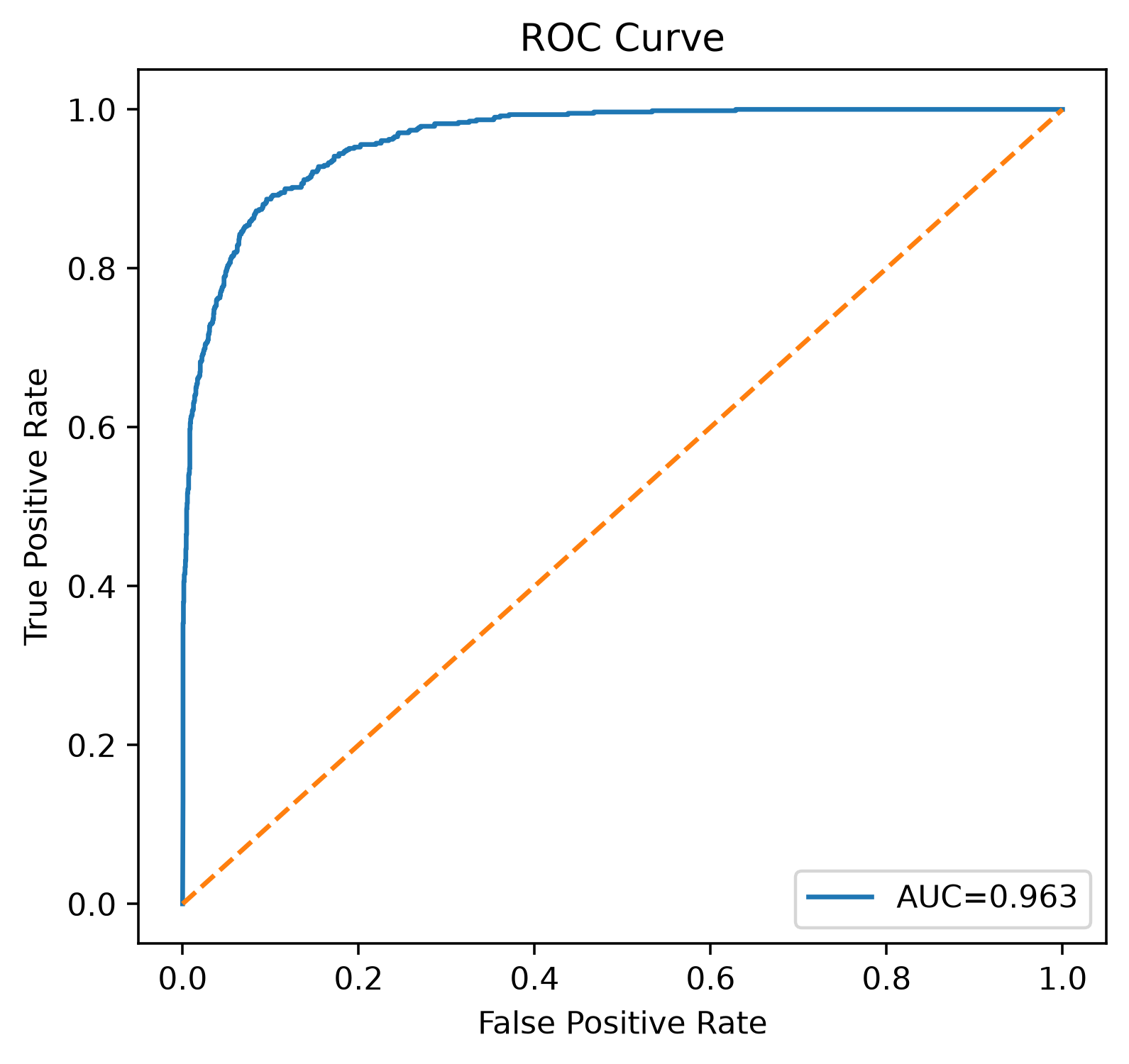
ROC summarizes threshold-dependent ranking behavior.
Company question: What tradeoff is available when positive cases are scarce?
import numpy as np
rng=np.random.default_rng(32); n=3500
pr_y=rng.binomial(1,.08,n); pr_score=np.clip(.05+.58*pr_y+rng.normal(0,.23,n),0,1)import matplotlib.pyplot as plt
from sklearn.metrics import precision_recall_curve,average_precision_score
p,r,_=precision_recall_curve(pr_y,pr_score); ap=average_precision_score(pr_y,pr_score); fig,ax=plt.subplots(figsize=(5.5,5)); ax.plot(r,p,label=f"AP={ap:.3f}"); ax.set(title="Precision–Recall Curve",xlabel="Recall",ylabel="Precision"); ax.legend(); plt.show()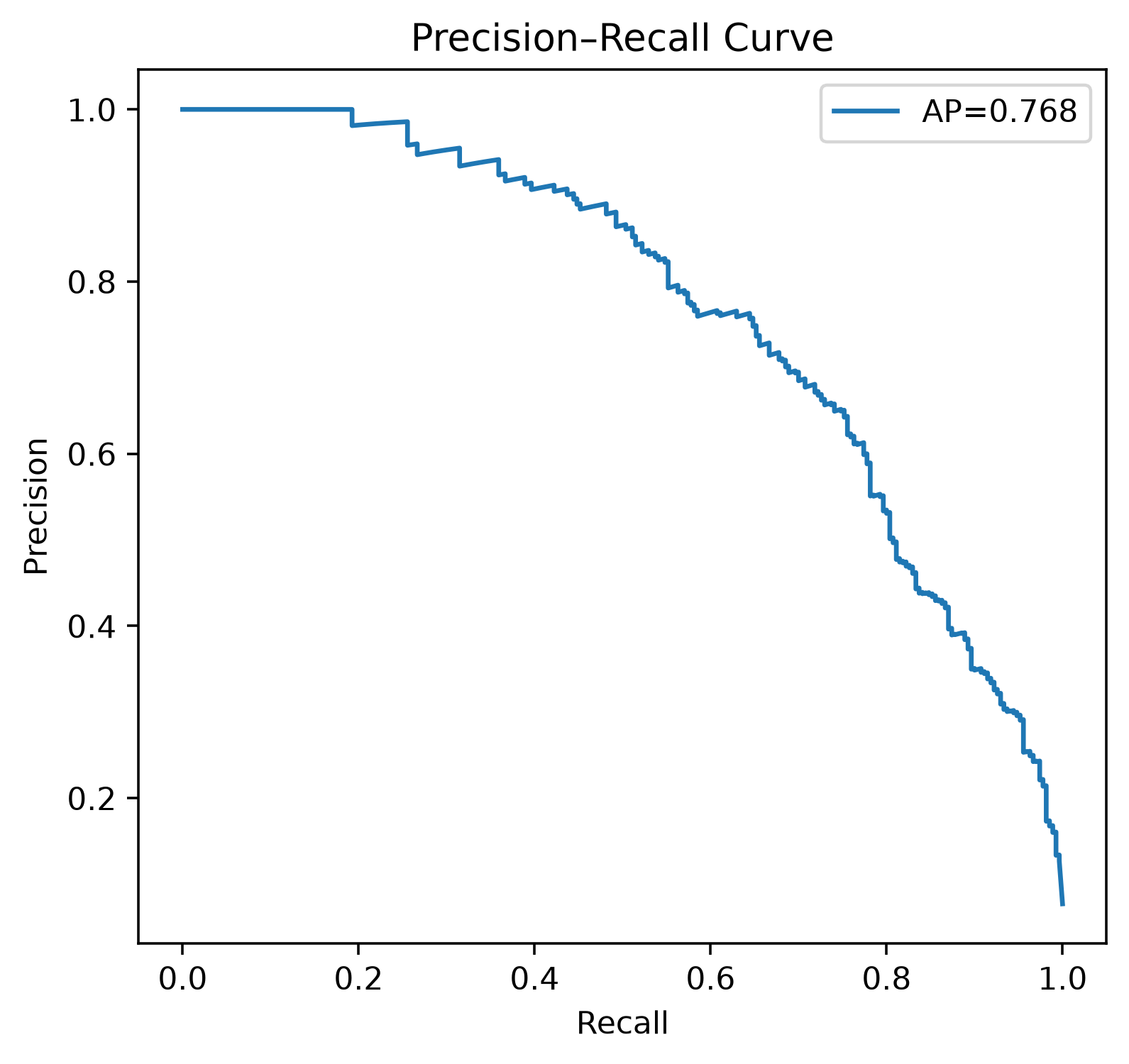
Often more operationally revealing than accuracy for rare events such as fraud.
Company question: Do predicted probabilities correspond to observed frequencies?
import numpy as np
rng=np.random.default_rng(33); n=4500
x=rng.normal(size=n); true_p=1/(1+np.exp(-1.3*x)); cal_y=rng.binomial(1,true_p); cal_score=np.clip(1/(1+np.exp(-.75*x)),.001,.999)import matplotlib.pyplot as plt
from sklearn.calibration import calibration_curve
obs,pred=calibration_curve(cal_y,cal_score,n_bins=10); fig,ax=plt.subplots(figsize=(5.5,5)); ax.plot(pred,obs,marker="o"); ax.plot([0,1],[0,1],linestyle="--"); ax.set(title="Calibration Plot",xlabel="Mean predicted probability",ylabel="Observed positive rate"); plt.show()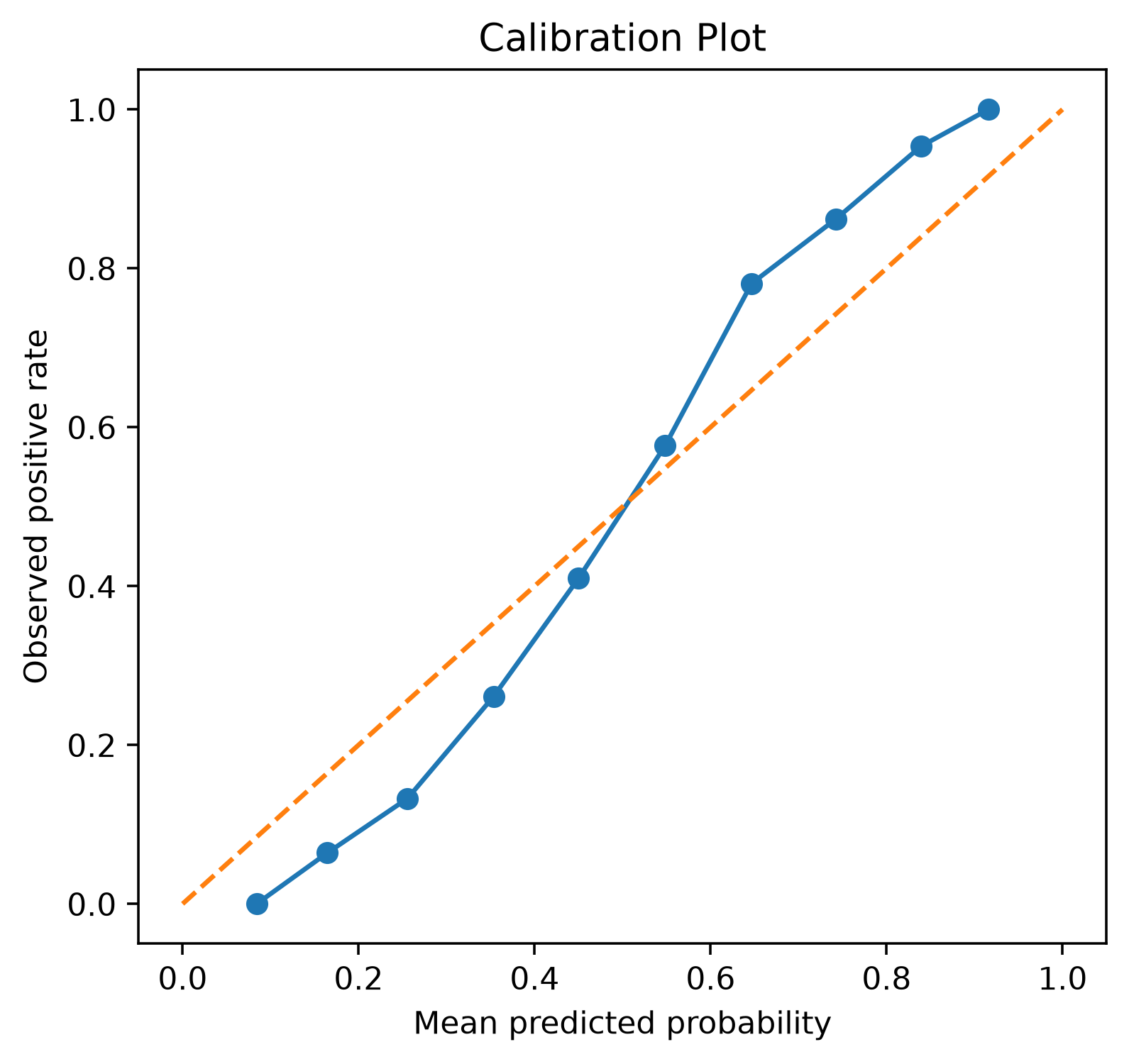
Ranking quality and probability calibration are different properties.
Company question: Does prediction error change systematically?
import numpy as np
import pandas as pd
rng=np.random.default_rng(34); n=1200
actual=rng.normal(100,25,n); predicted=actual+.10*(actual-100)+rng.normal(0,12,n); resid_df=pd.DataFrame({"predicted":predicted,"residual":actual-predicted})import matplotlib.pyplot as plt
fig,ax=plt.subplots(figsize=(7,4.5)); ax.scatter(resid_df["predicted"],resid_df["residual"],alpha=.28); ax.axhline(0,linestyle="--"); ax.set(title="Residual Plot",xlabel="Predicted",ylabel="Actual − Predicted"); fig.tight_layout(); plt.show()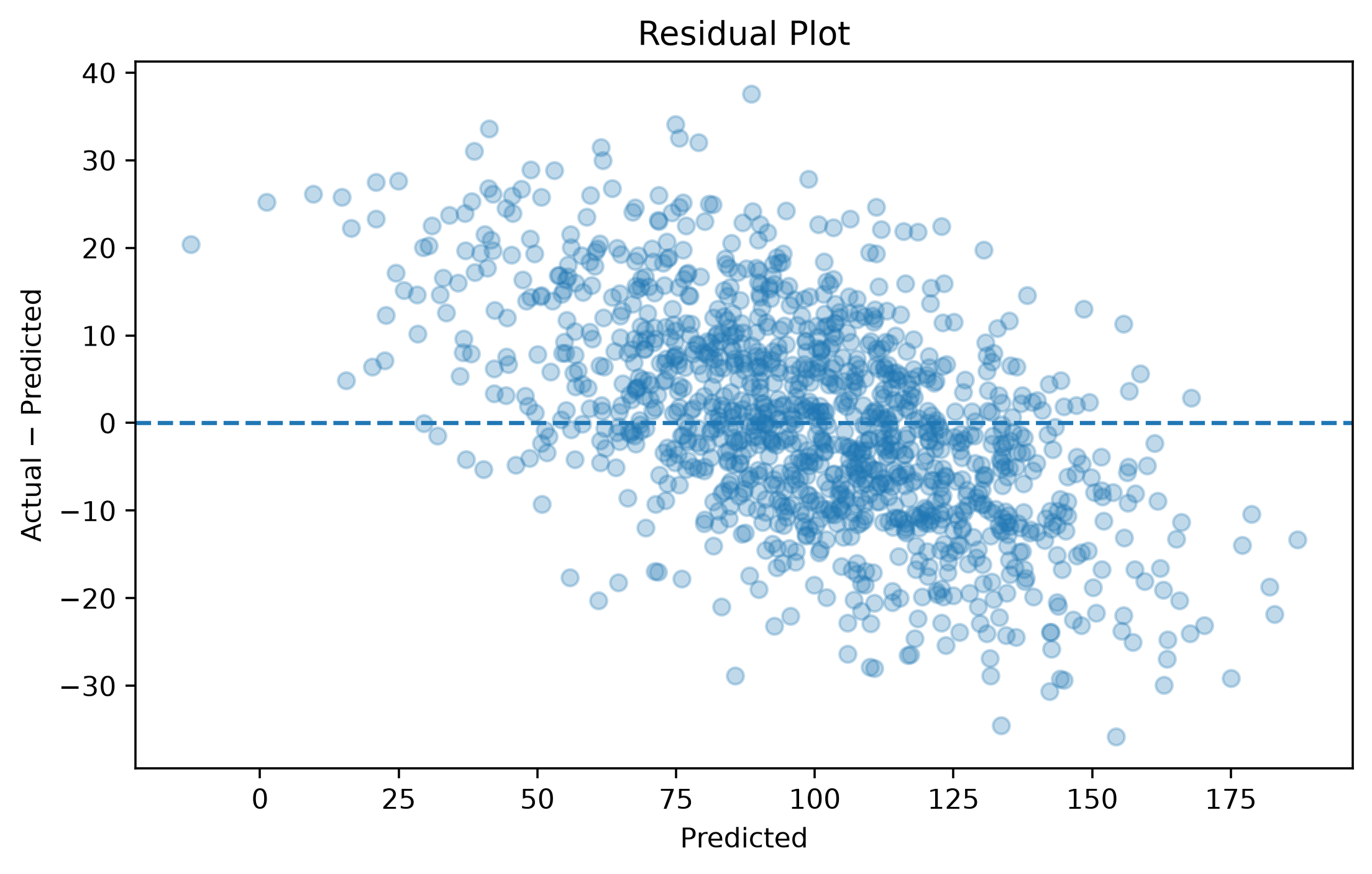
Residuals can reveal bias, nonlinearity and changing variance hidden by a single RMSE.
Company question: Which inputs contribute most under this importance definition?
import pandas as pd
imp_df=pd.DataFrame({"feature":["last_login_days","support_tickets","tenure","monthly_spend","sessions"],"importance":[.31,.25,.19,.14,.11]}).sort_values("importance")import matplotlib.pyplot as plt
fig,ax=plt.subplots(figsize=(7,4)); ax.barh(imp_df["feature"],imp_df["importance"]); ax.set(title="Model Feature Importance",xlabel="Importance"); fig.tight_layout(); plt.show()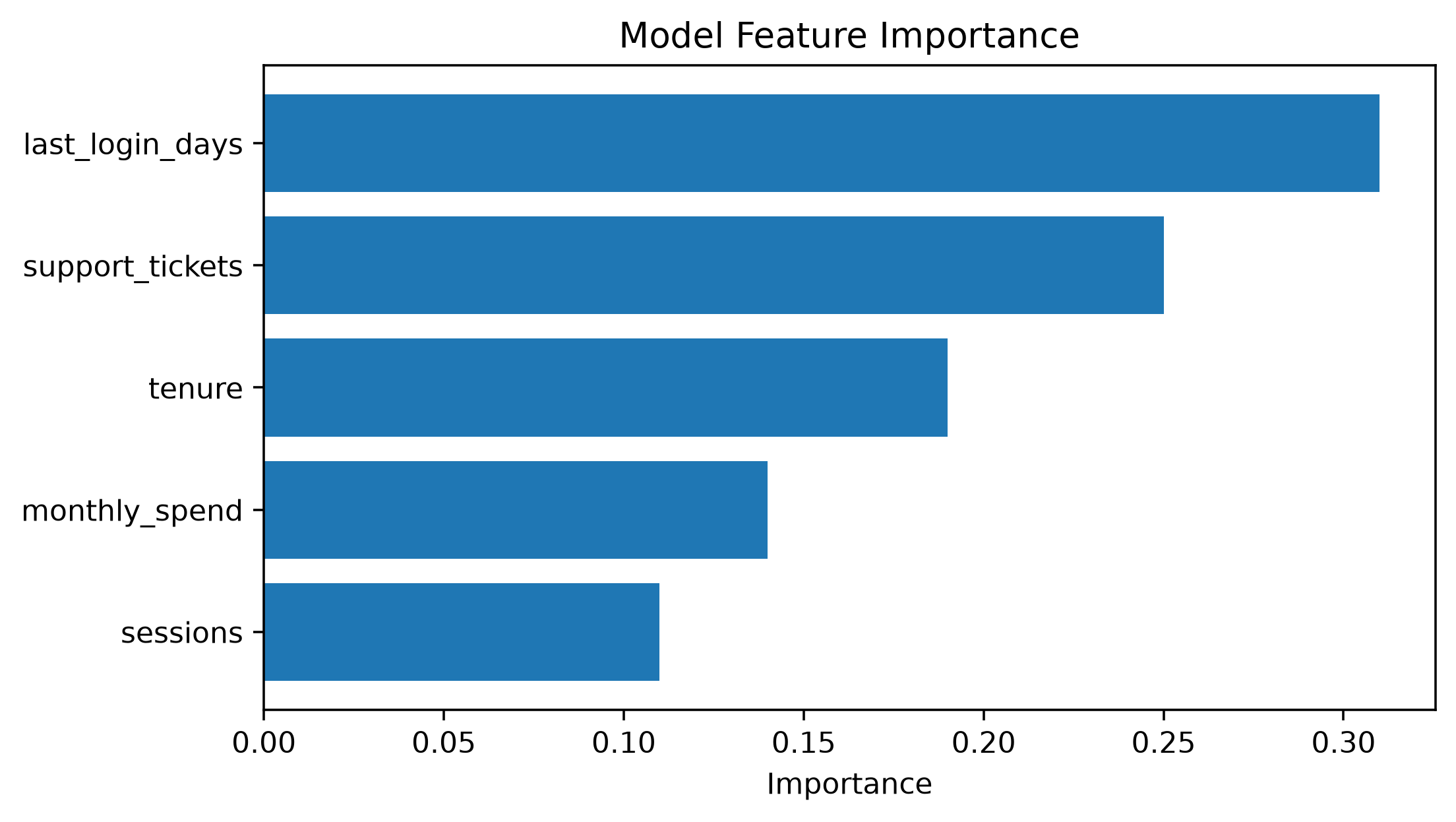
Company question: At which purchase stage is the largest loss?
import pandas as pd
funnel_df=pd.DataFrame({"stage":["Visitors","Product View","Cart","Checkout","Purchase"],"users":[100000,62000,21000,12000,9200]})import plotly.express as px
fig=px.funnel(funnel_df,x="users",y="stage",title="Purchase Funnel"); fig.show()Common in acquisition, onboarding, checkout and application workflows.
Company question: Where are orders concentrated around a service area?
import numpy as np
import pandas as pd
rng=np.random.default_rng(35); n=500
geo_df=pd.DataFrame({"latitude":30.27+rng.normal(0,.055,n),"longitude":-97.74+rng.normal(0,.065,n),"orders":rng.poisson(5,n)+1})import plotly.express as px
fig=px.scatter_map(geo_df,lat="latitude",lon="longitude",size="orders",hover_data=["orders"],zoom=9,height=500,center={"lat": 30.2672, "lon": -97.7431},title="Interactive Geographic Distribution of Orders"); fig.show()Use a map when spatial relationships matter. If the question is only “which region is largest?”, a sorted bar chart may be clearer.
| Need | Good starting choice |
|---|---|
| Custom static figure | Matplotlib |
| Statistical EDA | Seaborn |
| Publication/report control | Matplotlib |
| Interactive exploration | Plotly |
| Browser widgets / linked interaction | Bokeh |
| Declarative grammar | Altair |
| Huge point clouds | Datashader ecosystem |
| Interactive geospatial work | Plotly / PyDeck |
Exploratory: “What is happening?” → many views, interaction, diagnostics.
Explanatory: “Here is what matters.” → fewer views, intentional ordering, annotation, uncertainty, restrained color.
ONE NUMERIC → Histogram / KDE / ECDF / Box
NUMERIC + CATEGORY → Box / Violin / Bar + CI
TWO NUMERIC → Scatter / Regression / Hexbin
TIME → Line / Rolling trend / Uncertainty band
MATRIX → Heatmap
CLASSIFIER → Confusion / ROC / PR / Calibration
REGRESSION → Actual-vs-predicted / Residuals
LOCATION → Map only when spatial structure mattersIf Product asks “Why did conversion fall last month?”: